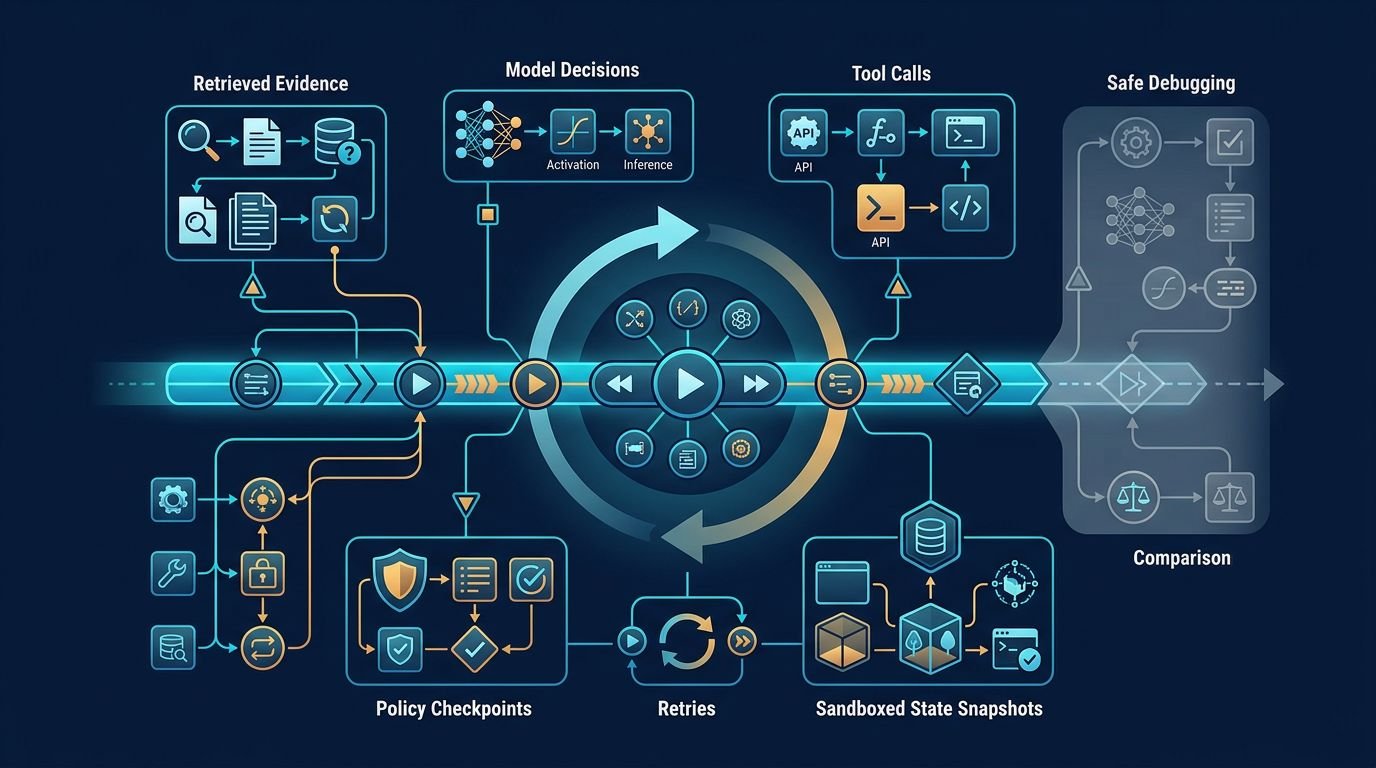
An agent can complete 99 percent of a workflow, then make one bad tool call you can’t reproduce. AI agent replay turns that vague incident into a run your team can inspect, compare, and test.
I don’t treat replay as a dashboard feature, but as a record of what the agent saw, chose, and did. That record captures the moment and helps teams debug AI agents after a bad tool call.
Key Takeaways
- AI agent replay preserves the agent’s decision path, including retrieved evidence, model outputs, tool calls, policy decisions, retries, and state changes—not only the final response or failed API call.
- Use append-only event logs for inspectable history, snapshots for fast restoration, and a hybrid design for long workflows with costly retrieval, browser automation, or code execution.
- Safe replay freezes inputs, restores a valid checkpoint, injects recorded responses, and redirects writes to sandboxes or mocks while enforcing the original guardrail policies.
- Compare event-by-event state transitions with check functions to find the first divergence, then turn verified failures into regression tests and reviewer-approved lessons.
Why replay beats log hunting
Plain logs often tell you an API call failed or an agent returned a bad answer. For AI agents, record and replay preserves the decision path, not just the failed API response.
A production failure is a historical event
An agent run depends on more than its final prompt. It may use retrieved documents, model output, tool calls and responses, memory, retry logic, feature flags, and user permissions.
If one of those inputs changes before you investigate, you are debugging a different run. Replay freezes the original evidence, then lets you walk through each state transition in order. You can use check functions to verify whether it reached the same state transition or tool-selection condition.
I start with execution traces that capture run IDs, session IDs, parent-child agent relationships, model settings, tool arguments, tool results, and policy decisions. Basic response logging isn’t enough once an agent can retrieve files or modify external systems. My guide to LLM observability tools covers the broader tracing and evaluation layer that supports this work.
Temperature zero isn’t a replay plan
Temperature zero reduces sampling variation. It doesn’t lock an agent run into a repeatable state.
The provider may update the underlying model. Retrieval may return a revised document. A live tool can return new inventory, billing, or customer data. Time-sensitive prompts, retries, and routing rules can also change the path.
A record and replay workflow can use the recorded model response when testing application logic. It can also rerun the request against the current model when testing behavior drift. Those are different tests, and I label them accordingly.

Record enough evidence for record and replay
A trace that captures only prompts and answers creates blind spots. For AI agents, retrieved evidence, model output, memory, retries, and permissions all affect replayability.
Capture ordered events, not one summary blob
I use an append-only event log for record and replay. Each meaningful action gets its own independently addressable event, linked to the larger run.
At minimum, record the following and use check functions to validate event completeness and schema integrity:
- A stable run ID, session ID, timestamp, and parent event ID.
- The model name, provider, prompt version, and generation settings.
- Retrieval query details, document versions, chunk IDs, and authorization result.
- Tool calls, normalized arguments, response, latency, and error state.
- Policy decision, ruleset version, approval state, and acting identity.
- Checkpoint references for state that would be expensive to rebuild.
The OpenTelemetry guidance on AI agent observability is useful here because it separates telemetry from the agent’s behavior. OpenTelemetry ingest can collect spans, metrics, and events, but replay still needs the original state and recorded side effects.
Keep protected evidence separate from metadata
I don’t default to storing every prompt, retrieved passage, or model output. Large context windows may include sensitive material, making privacy, retention, access control, and operational cost harder to manage.
Keep searchable operational metadata in the trace. Put sensitive prompt content, document excerpts, and tool payloads in protected storage with short retention periods and strict access checks. Before evidence is made searchable, use separate check functions for authorization, redaction, and policy metadata. Capture content only when the debugging value justifies it.
Your AI agent audit logs should show the authority chain too. A tool call without the user, policy, scope, and result is incomplete evidence.
A replay record must preserve what the agent was allowed to do, not only what the agent attempted.
Snapshot and replay solve different problems
Snapshot and restore preserve a point-in-time state. Record and replay rebuild a run through its event history. Most production systems need both.
| Approach | What it preserves | Main trade-off | Best use |
|---|---|---|---|
| Full snapshot | Complete state at a checkpoint | Higher storage and version-migration cost | Fast recovery after long workflows |
| Append-only event log | Ordered decisions, inputs, and tool outcomes | Rebuilding state can take longer | Debugging, audits, and trace diffs |
| Hybrid design | Checkpoints plus events after each checkpoint | More implementation discipline and operational cost for checkpoints and migrations | Multi-step agents with costly tool calls |
A snapshot can restore an agent quickly after a crash. It may not explain why the agent chose a dangerous action. Record and replay can explain the choice, but replaying thousands of events may be slow.
A hybrid design suits AI agents with long, costly agent workflows. Checkpoint replay restores a recent state, while record and replay preserves the agent’s multi-level experience between checkpoints.
I use checkpoints before expensive retrieval, browser automation, or code execution. I retain events after each checkpoint and use check functions to validate restored state. Checkpoint replay gives me a practical restore point without losing the agent’s multi-level experience or its tool calls.
A recent deterministic replay research project frames replay as a developer-first workflow. The principle holds even if you build the system yourself: preserve the inputs and side effects that matter, then compare behavior against a known run.

Run replays safely with guardrail policies
A record and replay run that contacts live systems isn’t a debugging tool. It’s another production run with a different label.
Freeze inputs and redirect side effects
Start with the failed trace, then use snapshot and restore to return the agent state to the closest valid checkpoint. During checkpoint replay, inject recorded retrieval results, model responses, and tool outputs instead of repeating live writes. That creates deterministic replay conditions, not a promise of identical model behavior forever.
Before running it, use check functions to confirm replay mode is active and side effects are blocked. For read-only tool calls, recorded responses are usually enough. For actions that write data, redirect the tool adapter to a sandbox or a mock. Never let a replay issue a second refund, send another email, or overwrite a customer record.
I also enforce the same guardrail policies during replay. AI agents still need explicit AI agent permission controls to restrict the test run as tightly as the original workflow.
Diff the state, not only the final answer
The final answer may look fine while the agent took an invalid path. Compare the record and replay with a known event history. Treat each boundary as a multi-level experience, not merely a final answer, and inspect execution traces for time-travel debugging.
- Use check functions to assert event-by-event equivalence for the retrieved evidence entering context.
- Check whether the model selected the same tool and arguments.
- Compare policy decisions, retries, errors, and state mutations.
- Use check functions to verify the final state, then identify the first event that diverges from the expected trace.
That multi-level experience can expose errors in the agent’s evolving state. This approach isolates the real failure class. If the agent receives different evidence, fix retrieval or version control. If it selects a different tool after identical inputs, investigate the model, prompt, or orchestration logic.
Teams already using trace and evaluation platforms can apply the same discipline described in LangChain’s agent observability overview. A trace is useful only when it leads to a testable explanation. Once verified, keep the replay as a regression testing fixture. That turns a one-time diagnosis into durable production reliability.

Turn failed runs into regression testing
The strongest replay systems don’t stop at incident review. They turn high-risk failures involving AI agents into release tests.
Use trusted checks for claims and actions
The multi-level experience idea behind AgentRR is useful in practice. Keep the failed run as episodic evidence. That keeps the multi-level experience tied to its original outcome.
At the trusted-check layer, multi-level experience should guide validation, not replace it. Record and replay can turn a verified incident into a repeatable application-logic test by injecting the original model output. Checkpoint replay can rerun the preserved incident as a release test without repeating its side effects.
I use deterministic validation for requirements that must not depend on model judgment. For JSON structure, check functions should reject malformed output. For account identity, check functions should compare the returned account ID with the requested ID.
Required citations need check functions that confirm supporting sources are present. Source freshness needs check functions that reject stale source versions. Finally, check functions can block tool calls outside their approved scope.
Factual claims that fail validation may signal LLM hallucinations. Remove them, replace them with a limitation, or route them to review. I don’t keep unsupported output because it sounds confident.
Preserve lessons without preserving every secret
Agent memory stores the original incident and outcome as episodic evidence. Semantic storage keeps approved, general rules, such as a 24-hour billing-source limit.
Long-term memory should preserve approved lessons, not every incident detail, because retaining everything raises operational cost. Keep those layers separate. Their relationship lets multi-level experience become approved experience only after review.
Agent memory doesn’t turn a model-generated summary into policy automatically. It becomes a reviewer-approved rule only after a reviewer approves its scope and expiration, preserving multi-level experience with clear boundaries.
Model deprecation also matters for multi-level experience. If an older model version is unavailable, recorded-output replay can still test your workflow logic. Label it as a simulation. It cannot prove that today’s replacement model will behave the same way.
Treat every incident as a test case
Fast debugging starts before the incident, when AI agents record and replay ordered events. Protect sensitive evidence, and use snapshot and restore for expensive state.
Agent workflows use check functions for verified assertions; guardrail policies block live writes during checkpoint replay, enabling safe reruns from expensive state boundaries.
Replay is not about perfect determinism; it shortens the path from failure to a verified cause, tested fix, and safer release. Each verified failure becomes a multi-level experience, an approved lesson rather than merely a closed incident. That supports regression testing and production reliability.
FAQ
What must an AI agent replay record?
Record trace and session IDs, model and prompt versions, retrieval results, tool arguments and responses, policy decisions, checkpoints, retries, and errors. Store sensitive content separately with access controls and retention limits.
How can AI agents be tested safely?
Use isolated environments, mocked tools, and reversible side effects. Give them least-privilege access, then compare outputs against expected policies and schemas.
What should check functions validate?
Use check functions to assert schema validity, identity, citation presence, freshness, and scope. Fail the test when a response violates any required condition.
What does multi-level experience mean for replay?
Treat each run as evidence across several levels, including tool calls, workflow decisions, and user-visible outcomes. This helps teams find whether a failure starts in one step or emerges across the workflow.
Is temperature zero enough for deterministic agent runs?
No. Temperature zero can reduce output variation, but it doesn’t freeze retrieved data, tool responses, provider changes, routing, timestamps, or workflow state. Replay needs recorded inputs and side effects.
When should you use snapshots instead of event logs?
Use snapshots when restoring complete state quickly matters most. Use event logs when you need to inspect decisions and compare runs. A hybrid design works best for long workflows with costly tool calls.
Can replay test a model that has been retired?
It can test application logic if you inject the recorded model output. That is a simulated replay, not a live model comparison. Test replacement models separately against the same golden runs.
Suggested related articles