
AI coding assistants can receive far more than the line under your cursor. Depending on their mode, they may see nearby files and repository instructions. They may also receive terminal output, error traces, and internal service names, creating data privacy risks. That makes AI coding privacy a design decision, not a preference toggle.
Cloud services offer capable models and low setup effort. Local models offer stronger control over where prompts go, but add hardware and operational work. I don’t think either option is automatically safe. The sensible choice depends on repository sensitivity, especially if it contains proprietary code or valuable intellectual property. It also follows the agent’s permissions and the evidence a vendor can provide.
Start by tracing the data, then decide which convenience is worth the exposure.
Key Takeaways
- AI coding privacy depends on the complete data path, including repository context, logs, retrieval systems, terminal output, and agent actions—not encryption alone.
- Classify repositories before enabling AI, then match the model, assistant, permissions, retention terms, and approval requirements to the sensitivity of the code.
- Cloud assistants provide convenience and strong model access, while local or self-hosted models provide more control over inference, storage, logs, and network boundaries.
- “Not used for training” and zero-retention claims address specific risks, so teams should verify plan-specific contracts, endpoints, subprocessors, metadata, and telemetry.
- Treat AI-generated code and dependencies as untrusted until testing, scanning, dependency review, and human approval are complete.
Start with the actual code path
Most weak privacy reviews begin and end with encryption. Strong encryption standards protect data in transit, but they only cover movement between systems. They don’t answer what the assistant receives, where it is processed, who can access logs, or what an agent can do after reading your repository.
A code completion tool may send a few local lines. An autonomous coding agent can pull nearby files, instructions, logs, and retrieved material into its context window. It can also create an index, run commands, open pull requests, install dependencies, and call outside services. Those are different risk levels.
Map every input and action
I start with a simple question: what leaves the developer’s machine during a normal request?
Map prompts, source-code context, retrieved documentation, issue descriptions, terminal output, stack traces, attached files, and generated patches. This should expose code leakage through unintended reads, transfers, or logs. Then map agent actions, including shell commands, package installs, browser sessions, Git access, and deployment permissions.
A tool that only completes a function has a narrow exposure path. A tool that can inspect a monorepo and execute commands has a much wider one.
Classify repositories before enabling AI
Not every repository deserves the same policy. Open source repositories, disposable prototypes, and generic utilities may be low-risk.
Open source code and test fixtures may suit broader tools. By contrast, proprietary code for payment systems, healthcare workflows, ranking logic, credentials, customer data, and unreleased products belongs in a stricter tier.
That classification should decide the assistant, model, access scope, and approval requirements. It should not be left to a developer guessing from a settings screen.
AI coding privacy: cloud assistants vs. local models
Cloud and local deployments solve different operational problems. Cloud-based AI models can improve developer productivity through stronger model performance, fast updates, and low setup effort. AI coding assistants running locally give you direct control over network boundaries, logs, storage, and model access.

| Question | Cloud assistant | Local or self-hosted model |
|---|---|---|
| Where inference runs | Vendor-managed infrastructure | Your workstation, server, or private environment |
| Who controls logs | The vendor, subject to contract and settings | Your organization |
| Setup effort | Usually low | Hardware, deployment, updates, and monitoring are your responsibility |
| Model access | Often broad and current | Depends on selected weights and available compute |
| Main privacy risk | Third-party processing and policy gaps | Weak local controls, telemetry, backups, or insecure admin access |
A larger context window can improve results, but it can also expose more repository material in each request.
A hybrid option can be sensible. Teams can use local processing for retrieval, repository indexing, and secret filtering inside their environment, then send only a tightly scoped prompt to a managed model. It reduces exposure, but it doesn’t make the cloud component disappear.
For a wider product view, these AI coding assistant reviews help separate privacy claims from deployment options.
Data retention is not the same as model training
“Your data is not used for training” is useful, but it isn’t a complete privacy answer. Evaluate data retention policies separately from training commitments. A provider can avoid using source code or prompts as training data. It may still retain them for security monitoring, abuse detection, debugging, billing, or legal obligations.
The reverse is also true. A short retention period doesn’t automatically say whether data may improve future machine learning models. Model-improvement commitments address how data may affect model weights, not whether request records are retained.
Ask policy questions that contracts answer
Retention, subprocessors, regions, endpoint coverage, and metadata create different data privacy risks. Procurement teams should request plan-specific answers, in writing, to these questions:
- Are prompts, code context, outputs, and file attachments retained after processing?
- Is any of that data used for model training or product improvement?
- Which models, endpoints, and regions are covered by the commitment, and what documented controls and security standards define that scope?
- Do subprocessors receive the request or any metadata?
- Can the company configure zero retention, shorter logs, SSO, audit records, and access controls?
OpenAI’s data controls documentation is a useful example of why the details matter. Default abuse-monitoring retention, modified monitoring, and zero-data-retention options are separate policies with different eligibility and endpoint coverage.
Zero retention still needs verification
Zero Data Retention is a strong term, not a magic shield. It may apply only to approved enterprise accounts, certain endpoints, or a limited set of models. It may also exclude account metadata, local IDE telemetry, support tickets, or artifacts stored elsewhere in the workflow.
“Not used for training” does not mean “not disclosed.” It only addresses one potential use after a request reaches the vendor.
Read the current product policy, the data processing agreement, and the model-hosting terms together. Compliance certifications can support due diligence, but they don’t prove every prompt path is suitable for your data. GitHub’s model-hosting documentation is a good reminder that the model provider and the product provider can have separate obligations.
Repository context turns small prompts into large exposure
The most common mistake is treating a coding prompt like a single pasted snippet. Modern AI coding assistants often build useful answers by collecting context. That context can include open tabs, nearby functions, repository-level instructions, embeddings from a code index, build logs, and ticket details.
A small question such as “fix this failing test” can reveal architecture, internal package names, feature flags, or data schemas.
Contextual adaptation is not permanent learning
People often say a model “learns the codebase” when it follows naming conventions or understands a project’s architecture. During a session, that is usually contextual adaptation, not a permanent model update.
The context window defines the active session boundary. If a vendor contract prohibits training and the service follows that promise, your prompt shouldn’t change the weights of its machine learning models.
The model can still produce code that matches your internal patterns because those patterns are present in the active context.
The privacy concern isn’t mystical learning. It’s how much sensitive material you gave the system, how long it remains available, and whether it appears in logs or later tool calls.
Agent permissions widen the exposure
Agents introduce another issue: their access can widen exposure. An agent with repository, terminal, and browser access can expose data without putting it directly in a chat prompt.
Malicious or misleading instructions in repository files, READMEs, tickets, or other inputs can also create prompt injections.
GitHub’s March 2026 policy update drew a clearer line between personal and organization-managed plans. Its privacy statement update says interaction data from personal Copilot tiers may be used to improve AI models unless the user opts out, while Business and Enterprise accounts are excluded from that change.
That distinction is why teams shouldn’t treat employee personal subscriptions as a substitute for managed accounts.
Local models keep more control inside your boundary
A local model can keep source-code prompts on a developer workstation or within an organization-controlled server environment. For regulated teams, air-gapped environments, and highly sensitive repositories, that difference can be decisive.

Local processing also gives your team control over patch timing, model versions, access logs, and how long indexed code remains available. It is the clearest route to keeping inference inside a defined boundary.
What local processing does not fix
Local processing does not mean secure by default. A self-hosted server may collect verbose prompts in logs. A desktop runtime may send telemetry. An IDE extension can still call external APIs. Backups may capture code indexes, and administrators may have broad access without proper auditing. These secondary systems can still create code leakage, even when inference stays on a workstation or private server.
Local deployments also need GPU capacity, model updates, vulnerability management, authentication, monitoring, rate limits, and disaster recovery. That is real operational work, not a box to check.
My view is simple: choose local models when the sensitivity of the code justifies owning that work. Don’t choose them only because “local” sounds private.
For an example of the deployment questions worth asking, see our Tabnine privacy and security review.
Cloud assistants can still fit controlled environments
AI coding assistants are not automatically off-limits for enterprise development. A managed service can be a reasonable choice when its contractual terms, technical controls, and operational model match the repository’s risk tier.
The convenience is real. Cloud-based AI models can offer strong model quality, broad language coverage, managed updates, and fewer infrastructure demands than a self-hosted stack.
Controls that make cloud use defensible
I would expect a serious cloud deployment to meet documented security standards. It should use organization-managed accounts, SSO, role-based access, audit logs, repository allowlists, content exclusions, and a written policy blocking personal accounts for company code.
Look for a data processing agreement, a clear subprocessor list, and incident notification terms. SOC 2 compliance provides an attestation about an examined control environment, not proof that a specific prompt path is acceptable. ISO 42001 and other compliance certifications can show that an AI management system exists, but they don’t establish suitability for your data.
A secure cloud setup also limits agent scope. Give the tool access to the active worktree, not every repository. Remove production credentials and restrict outbound network access. Require human oversight before the tool writes to a branch, installs a package, opens a pull request, or deploys.
Our GitHub Copilot privacy review covers the product-level controls that matter when evaluating a managed coding assistant.
AI-generated code needs a separate security review
Privacy controls don’t make generated code safe. It can contain security vulnerabilities, including weak validation, unsafe defaults, missing authorization checks, or brittle error handling. The output can also introduce dependency risk through packages that don’t exist.
Security review still matters, even when a model runs fully inside your network.
Hallucinated dependencies create supply-chain risk
A 2025 study of 576,000 AI-generated code samples found 440,445 hallucinated package references, or about 19.7% of package mentions. The study found that many false package names appeared repeatedly. That repetition creates a software supply chain risk, giving attackers an opportunity to register those names and distribute malicious code. Read the underlying package hallucination research before dismissing this as a rare model mistake.
Never let an agent install a suggested dependency without checking the official registry, publisher, version history, license, and integrity metadata. A plausible package name isn’t evidence that the package is legitimate.
Treat output as untrusted until tests pass
The Cloud Security Alliance reported that Veracode testing found OWASP Top 10 vulnerabilities in 45% of AI-generated code samples across more than 100 models. Its 2026 research note is a useful reality check.
Run unit and integration tests, static application security testing, secret scanning, vulnerability scanning, dependency review, and human review. These checks assess code quality beyond security: human oversight must validate dependencies and high-impact changes before merge or deployment. For pull-request-stage controls, compare AI code review tools for small SaaS teams rather than assuming the coding assistant will catch its own mistakes.
Put the policy into the development workflow
A written policy helps, but it cannot stop an over-permissioned agent at 2 a.m. Embed secure coding practices throughout the software development lifecycle, from the IDE and source-control platform to identity systems and CI pipelines.
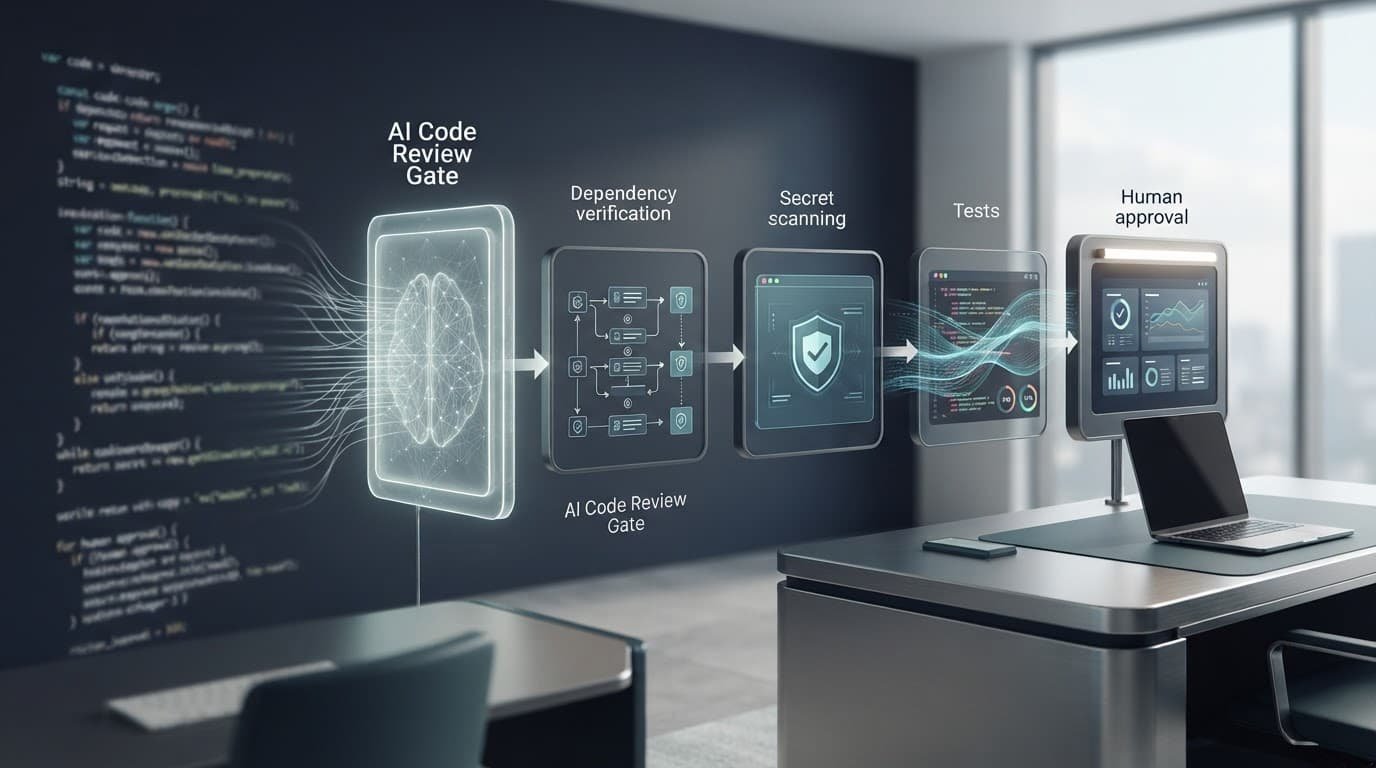
Build approvals into the pipeline
A practical policy-as-code setup translates security standards into testable gates across the delivery process:
- Classify repositories and block AI access to secrets, production configurations, regulated data, and protected branches.
- Filter prompts before they leave the environment, with secret scanners and allowlisted project directories.
- Keep code indexes and retrieval stores inside the company boundary where possible.
- Give coding agents short-lived credentials, a disposable worktree, and an outbound network allowlist.
- Require human oversight and approval for package installs, privilege changes, pull requests, deployments, and external data transfers.
My baseline is strict: an autonomous coding agent should get less access than a newly hired engineer, not more.
Test the sandbox like an attacker
Use a disposable repository with fake secrets outside the allowed worktree, suspicious README instructions that act as prompt injections, and a harmless package-install hook. Then review the evidence.
Did the sandbox block forbidden reads, writes, processes, destinations, and exfiltration attempts that could cause code leakage? Did the logs show each attempted action and denial? Did the agent stop at approval gates? A policy that only works during a friendly demo is not ready for production.
Choose a model based on data classification
The right setup depends on what the assistant sees and what it can do afterward.
| Situation | Practical starting point |
|---|---|
| Public projects, prototypes, and low-risk utilities | Managed cloud assistant with basic account controls |
| Internal applications without regulated data | Enterprise cloud plan with no-training terms, scoped access, and review gates |
| Sensitive intellectual property, proprietary code, or regulated workloads | Self-hosted or private-cloud inference with strict agent sandboxing |
| Highly restricted or air-gapped environments | Local processing with a model deployment that has no external egress |
Don’t force development teams into the most restrictive setup. That usually creates workarounds. Instead, offer a safe managed option for ordinary code and a tighter route for sensitive projects.
Use compliance certifications as supporting evidence, not as a substitute for scope controls, approvals, or testing.
The best policy is one developers can follow without bypassing it, while security teams can verify it without taking vendor promises on faith.
Frequently Asked Questions
Are cloud AI coding assistants private?
Cloud assistants can fit controlled environments when their contracts, settings, and technical controls match the repository’s risk tier. Teams should verify retention, training, subprocessors, access controls, endpoint coverage, and agent permissions rather than relying on general privacy claims.
Are local AI coding models automatically safer?
No. Local models keep more processing inside a defined boundary, but insecure logs, telemetry, backups, code indexes, administrator access, or IDE extensions can still cause code leakage. Self-hosted deployments also require their own authentication, monitoring, patching, and network controls.
Does “not used for training” mean that code is not retained?
No. A provider may avoid using prompts or source code to improve model weights while retaining request data for abuse detection, debugging, billing, security monitoring, or legal obligations. Training commitments and retention policies should be evaluated separately.
What should an AI coding agent be allowed to access?
Give the agent only the worktree and tools required for its task, with short-lived credentials, restricted outbound access, and no unnecessary production secrets. Require human approval for package installs, privilege changes, pull requests, deployments, and external data transfers.
How can teams test an AI coding assistant’s privacy controls?
Use a disposable repository containing fake secrets, prompt-injection instructions, and a harmless package-install hook. Check whether the sandbox blocks forbidden reads, writes, processes, destinations, and exfiltration attempts, and whether logs record actions and approval decisions.
A privacy decision that holds up
Cloud assistants win on convenience. Local models win on direct control. Neither choice excuses loose permissions, weak review practices, or unclear retention terms.
I’d start with the code path and restrict the agent before trusting it. Then I’d confirm the contract, configuration, permissions, access boundaries, and retention choices for the exact plan and endpoint in use. Privacy is not a product feature alone. It depends on coordinated controls and disciplined engineering.