Disclosure: This is a sponsored review, but my testing, observations, criticism, and final recommendation reflect my honest opinion.
Managing several Android accounts, testing mobile apps remotely, or building an AI automation workflow can get expensive when every task needs another physical phone. In this review, I examine how its remote Android devices handle multi-account management, app workflows, API and ADB automation, team access, performance, and security.
I’ll also explain what a cloud phone is, how MoreLogin Cloud Phone compares with an emulator, what its pricing actually looks like, and who should use it. I’ll start with the basic question: what is a cloud Android device, and when do you actually need one?
Key Takeaways
- MoreLogin Cloud Phone provides remote Android environments for multi-account management, app testing, affiliate marketing, and mobile automation.
- I found its API, ADB, synchronizer, team access, and batch controls useful for repeatable workflows.
- Pricing starts at $0.006 per minute with a $1.50 daily cap, or roughly $25 per device each month.
- The platform can reduce hardware overhead, but security checks, app compatibility, latency, and ongoing device costs still matter.
- It’s a practical fit for scalable mobile operations, not a universal replacement for physical Android phones.
Why Cloud Android Devices Are Replacing Some Physical Phones
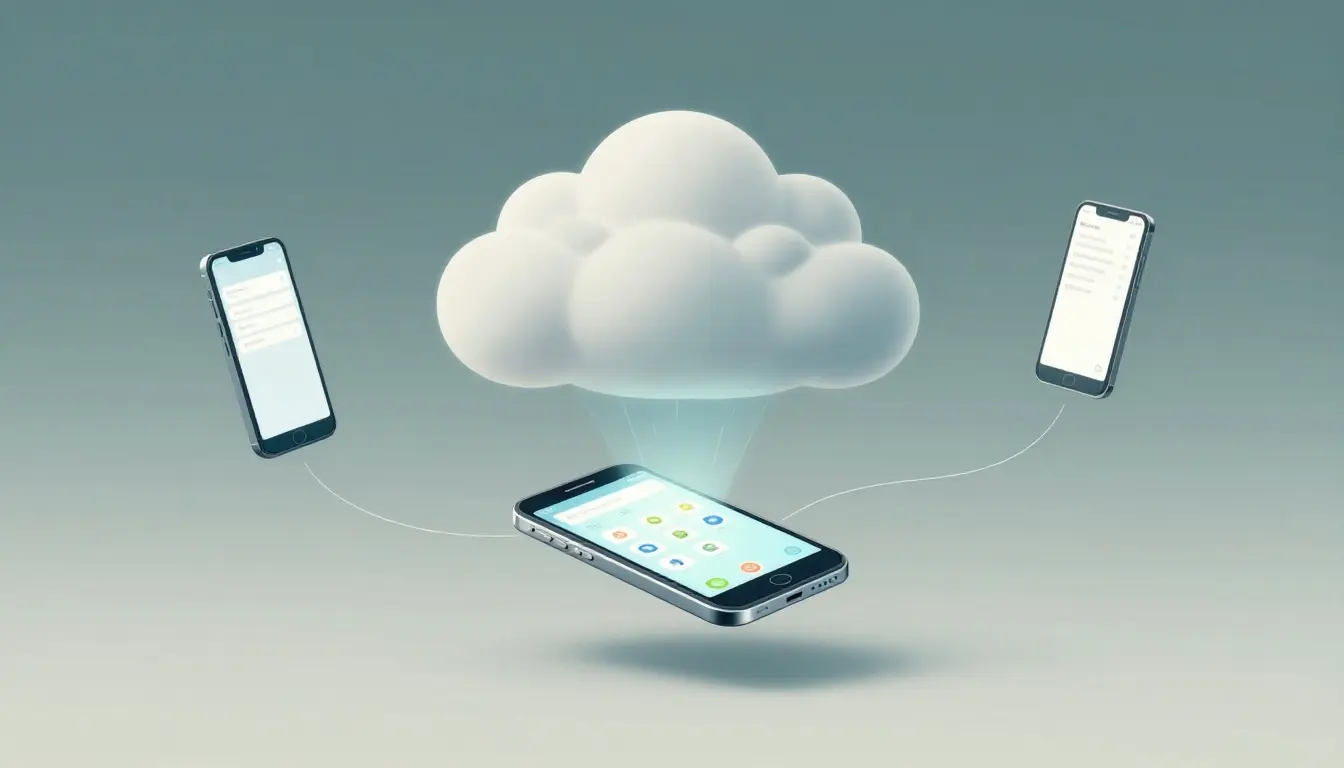
A cloud phone is a hosted Android environment that I access through the internet. It isn’t just a browser tab or an image of a phone. The apps, settings, storage, and device session run on remote infrastructure while I control them from my computer.
That changes the operating model. Instead of buying a separate phone for every account or workflow, I can create multiple remote environments and manage them from one workspace. These virtualized Android devices run on provider infrastructure, although performance still depends on the service, connection quality, app policies, and recurring costs.
What Makes a Cloud Phone Different From an Android Emulator?
An Android emulator imitates an Android device through software running on your computer. Developers often use emulators because they are quick to install, easy to reset, and useful for testing an app against different screen sizes or Android versions.
A cloud phone is different because the Android environment runs on a remote server. My computer acts as the control point rather than the device itself. This can make it an Android emulator alternative for remote, persistent workflows, but it isn’t identical to a local emulator.
An antidetect browser and its browser profile model are primarily browser-based. Tools such as GoLogin and Multilogin fit that category, while MoreLogin provides Android environments rather than browser-only workspaces.
That distinction affects several parts of a workflow:
| Area | Cloud phone | Android emulator |
|---|---|---|
| Where it runs | Remote hosted infrastructure | Local computer |
| Access | Available from supported remote connections | Usually tied to the computer running it |
| Device separation | Separate cloud profiles and sessions | Local virtual devices |
| Hardware use | Reduces the need for multiple physical phones | Uses local CPU, memory, and storage |
| Automation | Often includes API, ADB, or batch controls | Depends on the emulator and local setup |
| Best fit | Remote operations and multi-account workflows | Development and quick app testing |
Device behavior can also vary. A hosted Android environment may provide persistent profiles, location settings, installed applications, and account separation that are easier to organize across a team. MoreLogin Cloud Phone also supports synchronized actions, API access, and ADB-based workflows, which matter when the same task must run across several environments.
Hosted environments may still expose device or location characteristics, including a device fingerprint. Network routing is a separate layer, and some workflows may require residential proxies from providers such as NodeMaven. Neither the device environment nor a proxy service guarantees approval on any platform.
That doesn’t make cloud phones universally better. A local emulator is often more convenient when I need fast iteration, debugging tools, or offline testing. It also avoids the latency that comes with controlling a remote session.
The practical question is where the work happens. If you need a repeatable mobile operation that several people can access remotely, a cloud phone has a clear advantage. If you’re building and testing an Android application on one workstation, an emulator may be the simpler choice.
Why Businesses Move Mobile Workflows Off Physical Hardware
Physical phones work well, but each device adds purchase costs, charging requirements, updates, replacements, and storage concerns. A business managing ten or twenty mobile workflows can quickly end up maintaining a small hardware inventory.
A cloud phone can reduce that clutter. I can create separate environments for social media accounts, affiliate campaigns, QA tests, or client projects, then organize access from one central workspace. Distributed teams also avoid shipping devices between offices or asking employees to maintain company hardware at home.
The strongest business benefits are usually:
- Faster setup for short-term campaigns and testing projects.
- Remote access for employees, contractors, and agencies.
- Easier separation between accounts, apps, and client workflows.
- More consistent device organization across a team.
- Flexible scaling when a project needs more environments temporarily.
There are limits. Every session depends on a stable internet connection, and remote input can feel slower than a phone in your hand. Recurring fees also replace some hardware costs, so long-running devices need a proper usage calculation. Vendor dependence is another concern if your team relies on a provider’s infrastructure, support, or automation controls. NodeMaven may address a separate networking requirement, but it doesn’t remove those platform or provider limitations.
I would also check each app’s terms before managing multiple accounts. Some platforms restrict automation, account duplication, location masking, or unusual login patterns. Local privacy and business regulations may apply as well. A hosted Android environment can simplify the hardware problem, but it doesn’t remove the compliance problem.
MoreLogin Cloud Phone Review: Setup, Dashboard, and Daily Usability
I evaluated MoreLogin Cloud Phone around the parts that affect daily work: setup time, profile organization, remote controls, responsiveness, billing clarity, and dashboard usability. As a cloud phone layer, it lets me manage remote mobile environments without maintaining a separate physical phone for every account or workflow.
Creating the First Cloud Phone Profile
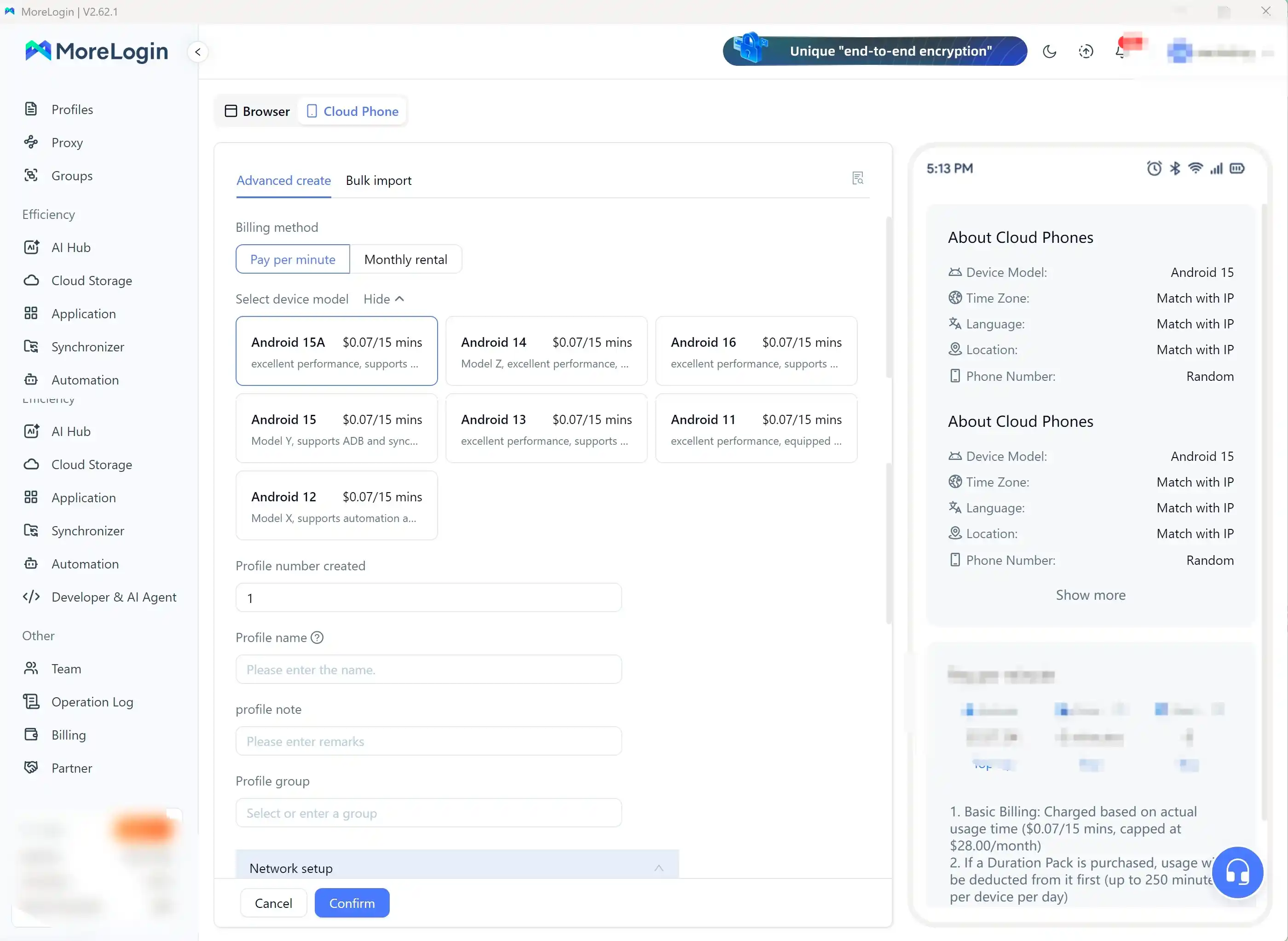
The setup flow is straightforward, but available choices depend on the current product version and account configuration. I start by selecting a device model, then create a new cloud phone profile with its own Android environment.
Before starting the device, I review the configuration settings. The important items include:
- Android version and device model.
- Country, language, time zone, and location behavior.
- Proxy integration and network settings, when the workflow requires them.
- App permissions and other environment-level options.
Residential proxies are a separate network choice from the hosted Android device. NodeMaven is one example of an external proxy provider users may evaluate, but it isn’t built into MoreLogin.
Once the profile is ready, I start the cloud phone and wait for the remote Android screen to load. From there, I install the required apps through the available app workflow, then sign in with the account assigned to that profile. I treat each profile like a separate workstation. A social media account, QA project, and affiliate campaign should not all share the same environment.
That separation makes routine work easier to audit. I can name profiles by client, application, or project, then avoid mixing files, credentials, notifications, and app data. Before following any setup guide, check the official profile creation instructions, since device models and settings can change.
Dashboard Controls and Remote Device Access
The cloud phone dashboard is where MoreLogin becomes practical for repeated operations. I can start, stop, open, rename, group, and monitor devices from one workspace. Grouping matters once the list grows beyond a few devices. Without a naming and grouping system, finding the right environment becomes a daily source of mistakes.
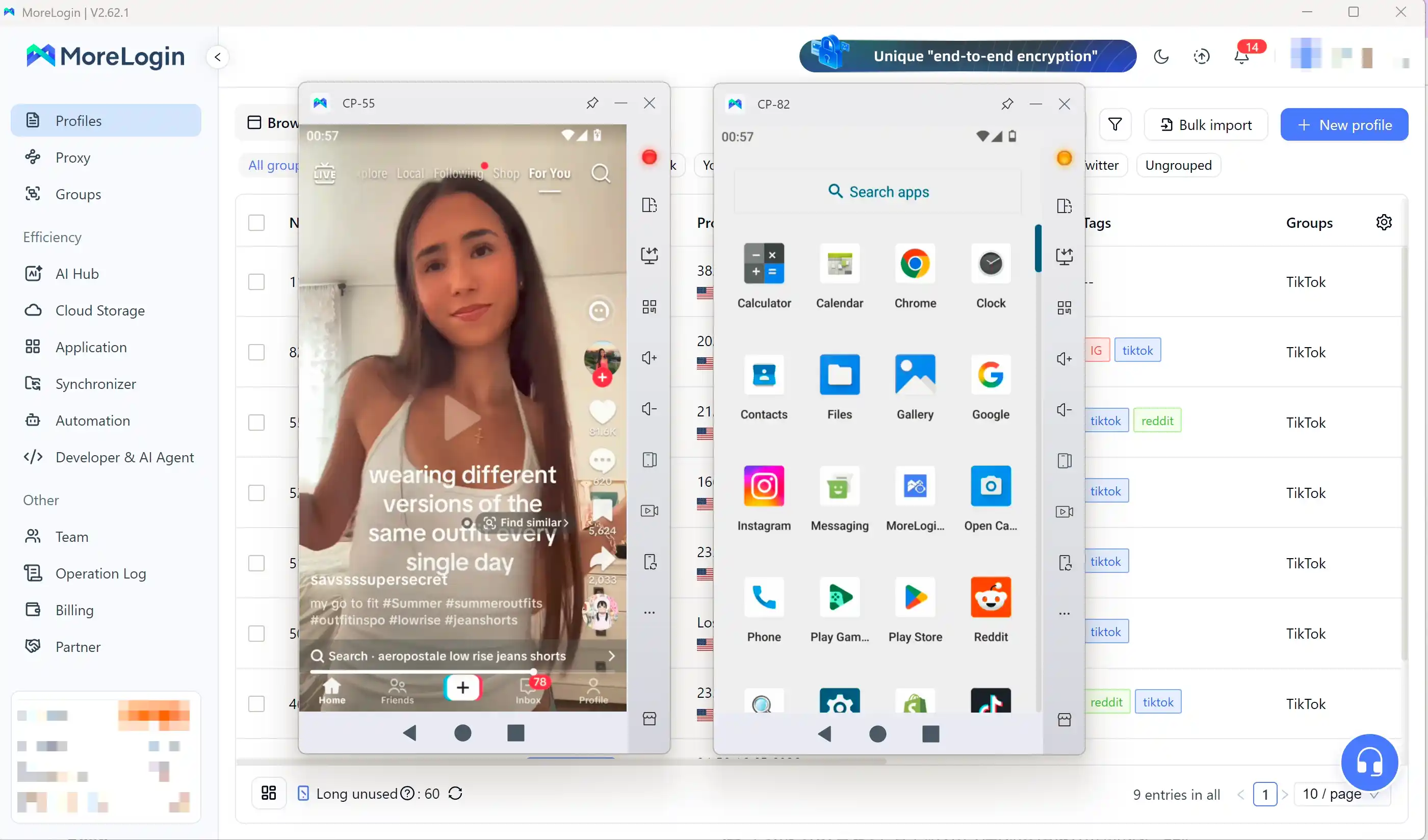
Synchronizer can apply synchronized actions across selected devices, but I use it carefully and only within permitted workflows. Remote control quality also depends on latency. A small delay is manageable when I review settings or launch an app. It becomes more noticeable during rapid taps, typing, file uploads, and multi-step app navigation.
The cloud phone works best when I use deliberate actions rather than treating the remote screen exactly like a physical phone. Closing the control window isn’t necessarily the same as powering off the device. A device may remain active or available while its viewing window is closed, which can affect usage charges and availability.
I also verify session continuity before stopping or disconnecting a device. Persistent profiles may preserve their state, but the exact behavior depends on the plan and device status. I check the dashboard before assuming a session has ended.
Security, Profile Isolation, and Responsible Account Management
Separate Android environments reduce accidental crossover between apps, logins, files, permissions, and notifications. A distinct device fingerprint may help organize environments, but profile separation is not guaranteed fingerprint protection and does not promise anonymity.
I still review location, language, time zone, permissions, credentials, and team access for every workflow. Permission management matters when assigning access for team collaboration. Sensitive login data should use strong passwords and appropriate authentication controls.
MoreLogin’s current privacy and security terms deserve review before storing confidential business or customer information. If a workflow uses NodeMaven or another external proxy service, check its configuration and privacy practices separately. Investigate location leaks, including a possible WebRTC leak, rather than assuming the cloud phone prevents them automatically.
Cloud phones don’t override app policies. You must follow each platform’s terms, avoid deceptive behavior, and confirm that automation or multiple-account use is permitted. Profile isolation cannot prevent an account ban caused by prohibited activity. Used responsibly, separate profiles reduce operational errors. They don’t make prohibited activity acceptable.
Core Features for Multi-Account Management and AI Automation
MoreLogin’s cloud phone is most useful when mobile work needs separation, repeatability, and remote access. I evaluate it as shared infrastructure for several Android workflows, not as a replacement for one personal phone.
Cloud Android Devices and Multi-Account Management
Virtualized Android devices help separate social media operations, affiliate marketing, app testing, and mobile customer workflows. Each cloud phone can hold its own apps, files, settings, and login session, so one project is less likely to affect another.
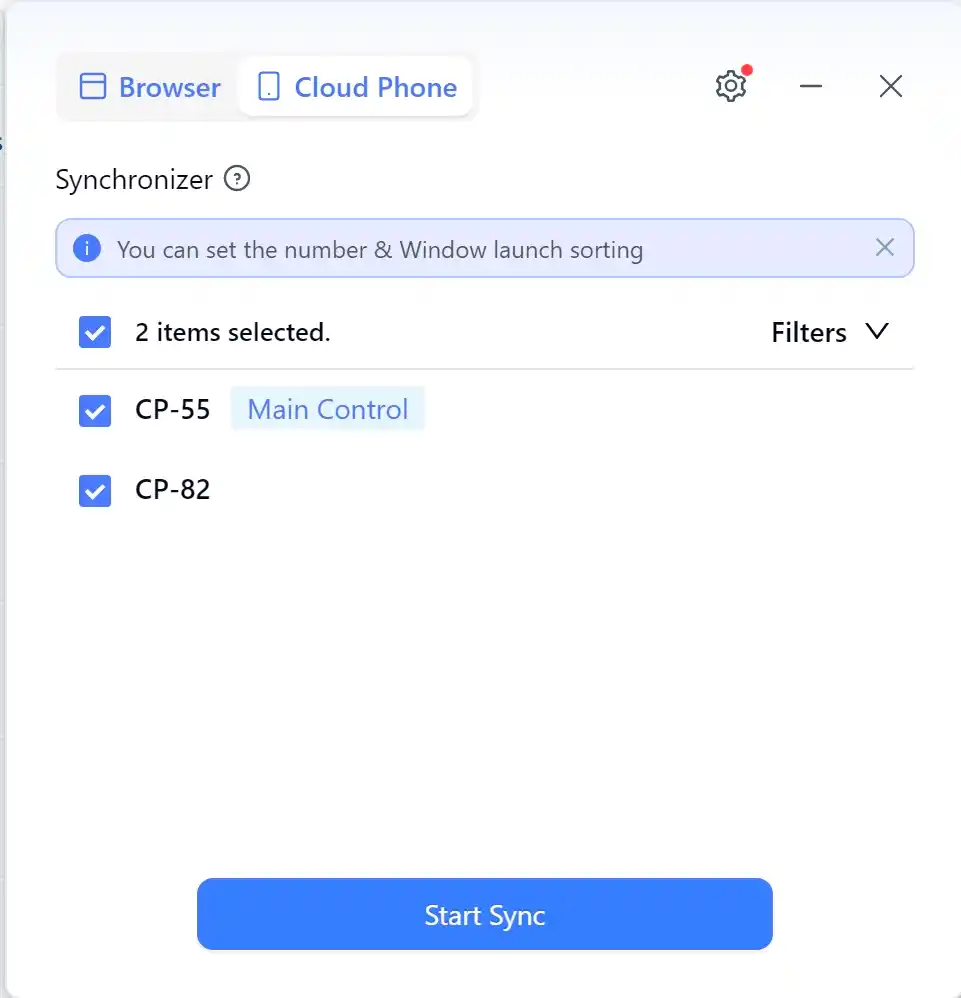
I use one-purpose profiles instead of general-purpose devices. A profile might support one client account, QA build, or campaign. Naming conventions matter as the device list grows. A format such as Client-App-Purpose-Region is easier to search than Phone 1 or Test Device.
I also keep an external inventory with the profile name, assigned account, owner, application, creation date, and status. This prevents a common error: forgetting which account belongs to each environment.
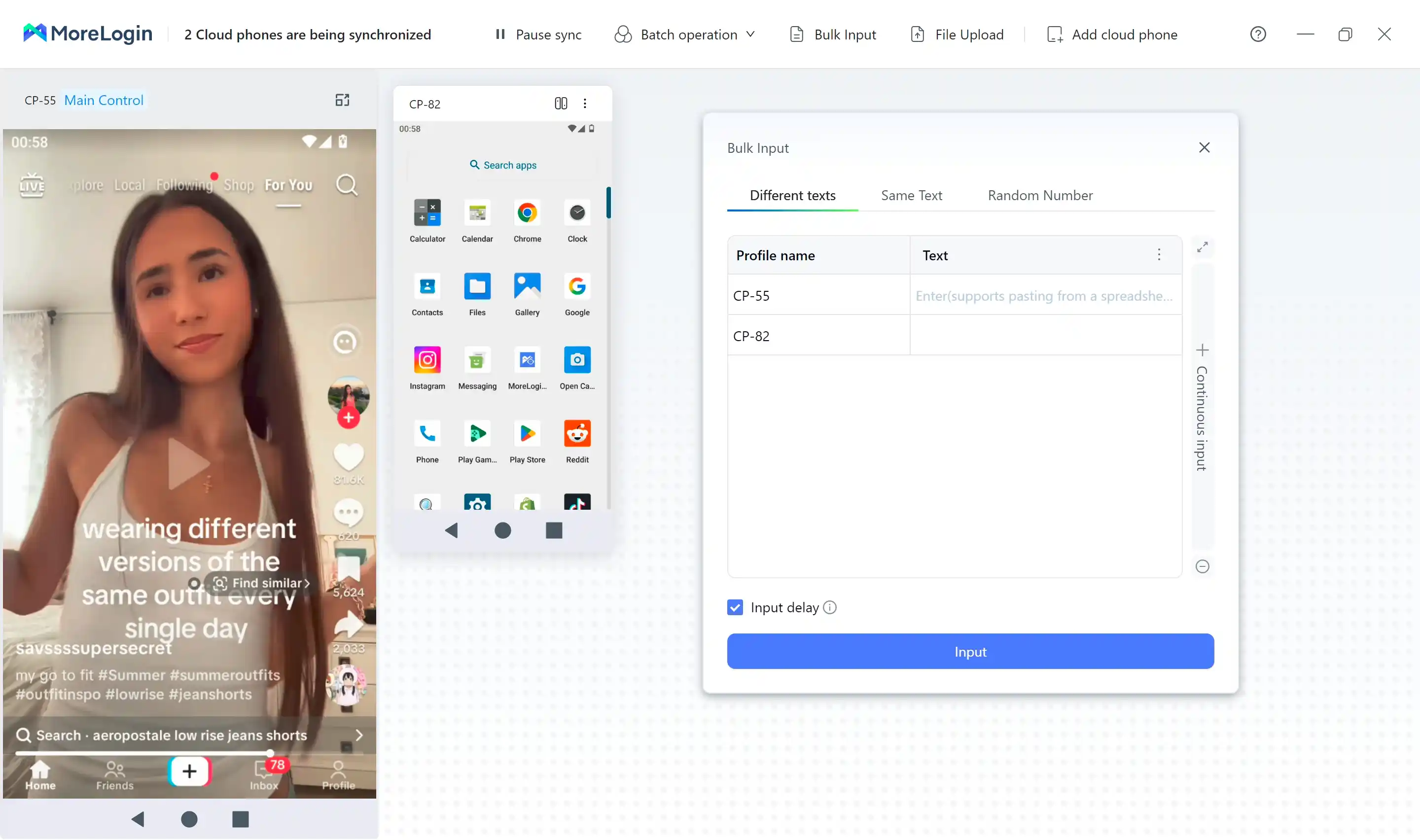
Synchronizer can apply the same selected action across multiple devices. This helps with scheduled testing, maintenance, and repeated setup tasks. I still review the selected profiles before running a synchronized action.
Multiple accounts aren’t automatically permitted on every platform. I check the relevant terms first, especially where automation, account duplication, location settings, or unusual login patterns are restricted.
Team Collaboration Without Passing Around Physical Devices
A centralized workspace supports team collaboration without shipping phones between employees or asking contractors to maintain company hardware. Team members can access an assigned cloud phone remotely, while administrators manage ownership and project organization from one place.
This setup can work well for agencies managing client accounts, small businesses running mobile support workflows, and QA teams testing builds across several environments. It also reduces handoffs. A team member can review the same device state without waiting for someone to ship or unlock hardware.
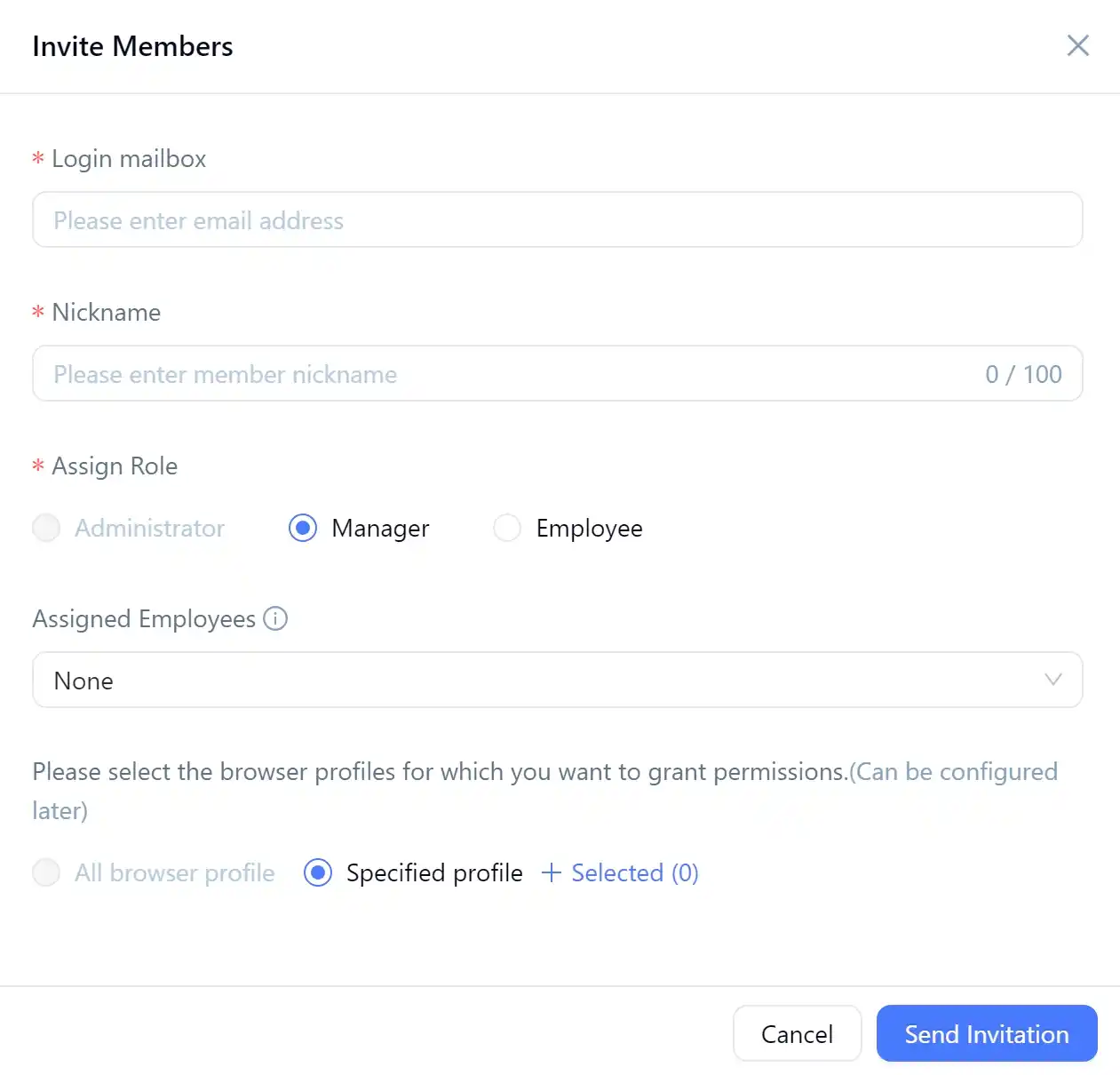
Before connecting a sensitive workflow, I would verify:
- Whether roles limit access to only the required devices.
- Whether login, device, and action history is available for audits.
- How permissions are granted and revoked.
- How long files, credentials, logs, and device data are retained.
Those details matter more than a shared dashboard when customer records, payment activity, or regulated data is involved.
API, ADB, and AI-Powered Workflow Automation
API access lets another system control device actions programmatically. ADB, or Android Debug Bridge, is a command-line connection for sending commands to Android. MoreLogin’s documentation describes ADB support for remote debugging and shell commands. Its API can start devices, install apps, upload files, and collect device information.
A practical RPA automation pipeline could launch a cloud phone, install a test build, open the app, run repeatable checks, and collect results. Synchronizer can also coordinate selected batch actions within that process. MoreLogin’s ADB workflow requires an active device and current connection address, so I plan for reconnection after shutdowns.
MoreLogin can complement existing automation tools rather than replace them. I test how the API connects with the rest of the stack before moving a workflow into production.
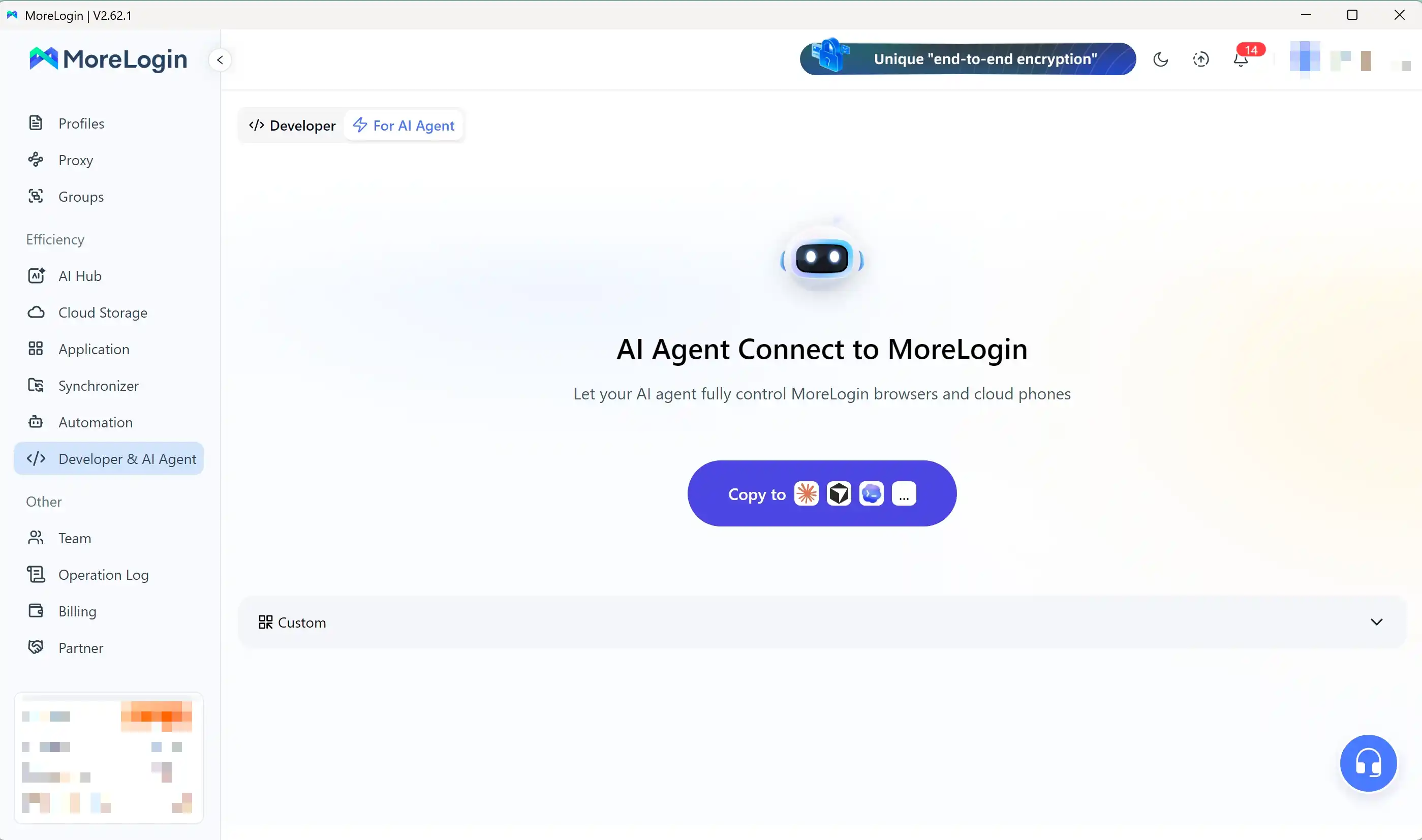
AI automation should still include human approval. I might let an AI system suggest which account needs attention, draft a response, or identify a failed test. I require approval before it changes account details, sends messages, makes purchases, or performs other irreversible actions.
Before production use, I test API limits, authentication, documentation quality, timeout behavior, retries, and error handling. Automation saves time only when failures are visible and recoverable.
Performance and Stability Under Real Workloads
I test more than whether the Android screen opens. My checks include app launches, scrolling, typing, file transfers, audio or video behavior, parallel sessions, and recovery after a disconnect.
A cloud phone handling light account tasks can tolerate some latency. Demanding games, video work, long-running automation, and graphics-heavy apps require more capacity. Performance can change with the selected device model, network quality, server load, and active device count.
I record practical results instead of inventing benchmark scores. Useful metrics include boot-up speed, app launch time, input latency, connection persistence, and manual recovery effort.
Each cloud phone should also be tested for session continuity after a disconnect. That shows whether app state persists and how often a user must reconnect or restart a workflow. These results provide a better basis for deciding whether MoreLogin fits the workload.
Pricing, Real Use Cases, and the Limits of the Value Proposition
MoreLogin makes the most sense when several mobile workflows need separate environments and remote access. A cloud phone doesn’t automatically make those workflows profitable or compliant. I still account for staff time, platform rules, content quality, testing coverage, and the cost of keeping devices active.
Social Media, Affiliate, and Remote Mobile Operations
An agency could assign one cloud phone to each client application, campaign, or regional workflow. One profile might contain a client’s social app, another could support affiliate marketing research, and a third could handle content scheduling and reporting. This separation reduces accidental crossover between logins, files, notifications, and app settings.
Some regional workflows also involve proxy integration for separate network configuration. Residential proxies may be part of that evaluation, but they aren’t required for every workflow or automatically compliant. NodeMaven is one provider teams might compare when estimating those external costs.
Remote access also changes team coordination. A manager can assign devices to contractors, review the current state of a workflow, and reclaim access without shipping physical phones. Each cloud phone can retain its assigned workflow between sessions, making session continuity relevant for recurring operations. For recurring work, I’d maintain an external inventory with the client, application, assigned user, profile name, and last review date.
The hardware savings are real, but limited. MoreLogin can reduce the need to buy, charge, update, and replace multiple phones. It doesn’t replace account reviews, editorial judgment, or human approval. Every platform still has its own rules for multiple accounts, automation, posting frequency, and content ownership.
I would also treat profile separation as organization, not protection from enforcement. If an account is reviewed, the business remains responsible for its activity, disclosures, security controls, and content quality.
App Testing and QA Workflows
Cloud Android environments are useful for repeatable checks. I can install a build, sign in with a test account, complete a workflow, reset the environment, and repeat the same sequence across separate profiles. API and ADB access can connect those devices to deployment scripts, RPA automation, or automated regression routines.
Cloud phone testing works well for:
- Installation and update checks.
- Login, logout, and permission flows.
- Form submission and navigation tests.
- Basic file uploads, notifications, and recovery checks.
- Repeatable validation across selected Android environments.
Physical devices remain necessary for tests involving exact camera output, GPS behavior, accelerometers, battery drain, cellular handoffs, Bluetooth accessories, and unusual hardware combinations. A cloud phone can confirm that an application behaves in a hosted Android session. It can’t reproduce every condition a customer experiences in the field.
Pros, Cons, and the Break-Even Question
Current published figures show pay-per-minute billing at about $0.006 per powered-on minute, with a $1.50 daily cap. Monthly rental is listed at about $25 per cloud phone for 30 days. NodeMaven or another external provider can add proxy costs, so I check the MoreLogin pricing page before buying.
If you’re new to the platform, MoreLogin also offers a practical way to test Cloud Phone before committing to a paid workflow. New users receive 2 free Cloud Phone profiles and 100 free Cloud Phone minutes, which is enough to evaluate the dashboard, device performance, remote controls, and basic automation features before deciding whether the service fits your workflow.
| Usage pattern | Practical cost reference | Best billing fit |
|---|---|---|
| Occasional testing | About $0.006 per active minute | Pay-as-you-go |
| Daily operations | Up to roughly $1.50 per day | Compare both options |
| Always-on device | About $25 per 30 days | Monthly rental |
The main strengths are remote access, profile separation, team organization, flexible billing, and lower hardware overhead. The main weaknesses are internet dependence, latency, recurring charges, a learning curve, device-model limits, changing documentation, and security responsibility remaining with the user.
I calculate break-even using more than the subscription. I add setup time, recovery time, staff access, physical phone purchases, charging, updates, replacements, and the cost of failed tests. External services such as NodeMaven can further change the estimate for regional workflows. Those costs don’t make the service inherently compliant or prevent enforcement.
If a physical device already covers the workload, MoreLogin may add expense instead of removing it. If the operation needs several consistently available Android environments, the cost of each cloud phone becomes easier to justify. I also compare the value of persistent state against active-session charges before choosing a plan.
Who Should Use MoreLogin Cloud Phone Instead of Staying With Physical Devices?
MoreLogin Cloud Phone is a reasonable candidate when your mobile operation needs several separate Android environments, remote access, or repeatable automation. It is less useful when you only need one device, work offline, or depend on hardware-specific testing.
I’d treat the first cloud phone subscription as a controlled infrastructure test, not a simple phone replacement. It changes how you handle access, billing, data, troubleshooting, and ownership.
If you only need browser-based profile management, an antidetect browser may fit better. Products such as GoLogin and Multilogin belong to that category, but they don’t provide the same Android capabilities.
A Practical Checklist Before Starting a Subscription
Before paying, I use this checklist to separate a genuine operational need from a convenient-looking subscription:
- Confirm app and platform policies. Check whether the apps permit multiple accounts, automation, remote access, location settings, or scripted actions. MoreLogin can separate environments, but it can’t make restricted activity acceptable or prevent an account ban.
- Estimate active minutes. Record how long each cloud phone will stay powered on during a normal week. Pay-as-you-go billing may suit occasional testing, while frequent use needs comparison against the monthly rental price. Include idle cloud storage charges and unexpected recovery sessions in the estimate.
- Count simultaneous devices. List the maximum number of cloud phones that must run at once. Parallel-use limits can affect performance and cost, especially when a team launches several profiles together.
- Test latency from every team location. A session that feels responsive in one office may lag for a contractor in another state or country. Test typing, scrolling, uploads, app launches, and automation triggers before committing.
- Review permissions, proxies, and data handling. Identify what credentials, files, customer records, screenshots, and app data will pass through the hosted environment. Review team roles, app permissions, credential access, retention terms, and logging as part of permission management. If using NodeMaven, validate its credentials, endpoint behavior, and any WebRTC leak risk. Cloud security failures often begin with weak access controls, not advanced technical attacks, as outlined in common cloud security risks. I also include recurring NodeMaven costs in the security and operating budget.
- Check API and ADB requirements. Confirm that the available API endpoints, ADB connection process, authentication, rate limits, and error responses match your automation tools. A feature listed on a product page is not enough. I need to know whether it works reliably in my actual pipeline.
- Run one small workflow first. Test a single account, app, or QA routine. Measure setup time, connection recovery, app compatibility, session continuity, and manual intervention after disconnection. A cloud phone pilot exposes problems before adding more devices multiplies them.
- Document profile ownership. Keep an external inventory showing the profile name, assigned account, application, owner, location settings, creation date, credentials custodian, and current status. Record the profile creation details so account ownership remains clear when staff change or a project ends.

I’d use trial minutes or a limited pilot whenever they are available. A cloud phone pilot exposes latency, permissions, billing, and app-policy problems before they affect the whole operation.
Physical devices remain the safer choice for offline work, hardware testing, cellular behavior, and sensitive data that cannot leave company-controlled equipment. MoreLogin’s cloud phone becomes easier to justify when centralized access, profile separation, and scalable Android workflows matter more than direct hardware control.
Frequently Asked Questions
These are the questions I would still ask before adding MoreLogin Cloud Phone to a production workflow. The short answers focus on cost, account separation, automation, and the practical limits I found during evaluation.
Does MoreLogin Cloud Phone offer a free option?
MoreLogin has a general free plan that may include a limited number of browser profiles, but cloud phone use is billed separately. Usage charges and proxy costs may apply, depending on your setup.
I wouldn’t treat the free account as a completely free testing environment. Before creating several devices, I would confirm the current profile limits, device charges, and storage fees on the MoreLogin pricing page.
Can MoreLogin Cloud Phone replace a physical Android phone?
It can serve as an Android emulator alternative for remote app access, account organization, basic testing, and repeatable workflows. It doesn’t reproduce every hardware condition, though. Camera behavior, cellular handoffs, Bluetooth accessories, battery drain, and sensor testing still require real devices.
I use a cloud phone when remote access and device separation matter more than direct hardware control. For hardware-specific QA or offline work, a physical Android phone remains the safer choice.
Is MoreLogin Cloud Phone safe for managing multiple accounts?
Separate environments can reduce accidental crossover between logins, app data, files, and notifications. They cannot guarantee protection from an account ban or override an application’s rules.
I still review each platform’s policies before using multiple accounts, location settings, or scripted actions. Security also depends on permissions, credentials, team roles, and the applications installed inside each environment.
Android device management guidance from IBM’s mobile security overview is useful context. Malware, excessive permissions, and data leaks remain relevant risks.
Does the cloud phone support API and ADB automation?
Yes. MoreLogin provides API access for device management, including actions such as creating, starting, and editing devices. It also supports ADB, which can connect an active Android environment to shell commands, debugging tasks, and test scripts.
I would test authentication, rate limits, connection recovery, and error responses before using either method in production. An API that works for one device may need retries and queue management when several devices start together.
Are proxy costs separate from MoreLogin charges?
Yes. Proxy pricing, compatibility, and policy compliance are separate from MoreLogin billing. An external provider such as NodeMaven may charge according to its own service terms.
I would verify the proxy type, location coverage, bandwidth limits, and app compatibility before connecting it. The application you use may also restrict certain network configurations.
What happens if a cloud phone is not used for several days?
Idle devices can still create storage-related charges. MoreLogin’s support information states that a device left unstarted for seven consecutive days may incur an additional fee per 24-hour period.
I would stop or delete unused devices rather than leaving them in the account indefinitely. A monthly inventory review helps identify old profiles, abandoned test environments, and devices that no longer justify their cost.
Which MoreLogin model should you choose?
The right model depends on the workload, not only the Android version. A basic model may suit account checks and lightweight app tasks, while a higher-performance option is more appropriate for demanding apps or workflows involving sound.
Model names and specifications can change, so I would verify the current details before purchase. I would also test the exact application, input latency, audio behavior, and parallel device count during a small pilot.
Is MoreLogin Cloud Phone Worth the Cost?
What impressed me most in this MoreLogin Cloud Phone Review was the mix of separate Android environments, remote access, batch controls, and API or ADB support. These features can justify the cost for teams managing several mobile accounts, repeatable QA tests, or AI-assisted workflows. Device separation and centralized control can save meaningful time.
I’d still investigate app compatibility, latency, security practices, current pricing, and platform rules before moving a production workflow. MoreLogin is infrastructure, not a shortcut around account policies, and it doesn’t replace physical devices for offline work or hardware-specific testing. If your main need is profile management, compare MoreLogin with GoLogin and Multilogin before choosing hosted Android access.
I recommend starting with one small cloud phone workflow, confirming current pricing and terms, then scaling after measuring stability, total cost, and team productivity.