A chatbot connected to customer records can create more exposure in an afternoon than a forgotten software update creates in a month. That exposure can raise the risk of data breaches, but AI isn’t unsafe by default. Teams often connect generative AI tools, chatbots, agents, and workflows to private data, inboxes, code, and cloud accounts before setting clear limits.
For a U.S. small business, the right AI security software provides visibility and control without requiring an enterprise-sized security project. Start by inventorying AI workflows, then identify sensitive data and privileged actions in each one. Buy AI risk controls for measurable gaps, including model protection and AI governance needs, rather than every new tool.
The goal isn’t to buy every new security product. Use AI-SPM to organize AI exposure and controls, then close gaps that ordinary endpoint, identity, and cloud tools don’t see. This guide uses independent analysis and isn’t a competitor ranking.
Key Takeaways
- Start by inventorying each AI workflow’s data, identities, integrations, permissions, and possible actions before choosing security software.
- Prioritize prompt injection, sensitive-data exposure, excessive agent permissions, insecure integrations, and weak audit trails as practical small-business risks.
- Use AI-SPM for AI asset discovery and posture management, but add runtime controls for prompts, retrieved content, outputs, and tool calls where needed.
- Keep endpoint, identity, cloud, backup, patching, and MFA controls as the security foundation; AI-specific tools should supplement rather than replace them.
- Pilot controls on one high-risk production workflow, measure blocked actions and exposure reduction, and match spending to a defined business risk.
Start with what you need to protect
Small businesses often begin with a tool list. That is backwards. Start with each workflow’s accessible data, systems, and actions. Then prioritize risk management by data sensitivity, business impact, and permission scope.
A marketing team using ChatGPT for headlines faces less risk than a support bot searching customer tickets. An AI coding assistant with repository access creates another set of decisions. Treating all three as “AI use” hides the details that matter.
Map data, identities, and actions
Build a short inventory for every approved AI tool or internally built AI app. Include:
- The model provider, hosting location, and account owner.
- The data sent into prompts, retrieval systems, APIs, and logs, plus the data protection controls that apply.
- The people, service accounts, and external connectors with access.
- The actions an agent can take, such as sending email, querying a CRM, editing code, or changing cloud settings.
- The business owner who can approve or shut down the workflow.
- The ownership, retention period, approved data sources, and acceptable prompt use that your data governance requires.
For a growing environment, AI-SPM can help discover AI assets, identities, and risky configurations. It supports discovery and posture assessment, not runtime enforcement. A smaller team can keep this inventory in a shared spreadsheet rather than a 50-page governance document. The point is to find the systems where one bad prompt could expose data or trigger an unwanted action.

Separate low-risk use from connected automation
I would put AI use into three simple groups: public-content work, internal assistance, and connected automation. Public-content work has the lowest stakes when staff use no private information. Internal assistance needs data rules, while connected automation needs strict identity, permission, and monitoring controls.
A simple drafting assistant is different from agentic AI. An agent that can read an inbox, browse the web, and update a customer record is not “just a chatbot.” It is privileged automation with a conversational interface.
AI security risks that deserve budget in 2026
The OWASP Top 10 for LLM applications remains a useful starting point because it focuses on risks affecting modern generative AI applications. The current 2026 material helps teams map failures to their own deployments. LLM security starts with knowing which risks apply to your stack. You don’t need to solve every category on day one.
For most small businesses, the first concerns are malicious instructions, sensitive-data exposure, excessive agent permissions, insecure integrations, and weak audit trails. AI-SPM posture tools can identify exposed AI assets and weak configurations, giving small teams a practical starting point.
Prompt injection is not only a bad user prompt
Prompt injection happens when malicious instructions in untrusted content try to override an AI system’s instructions. That content may come from user messages, PDFs, email, browser content, or retrieval results.
A customer support agent might be told to summarize an uploaded document. A prompt injection hidden in that document could tell the model to ignore policy and expose private account details. The model may not follow those instructions every time, but “usually safe” isn’t a security control.
A guardrail that checks only user prompts misses instructions hidden in retrieved documents, browser content, emails, and tool outputs.
Adversarial attacks can manipulate inputs to evade a classifier or policy check. Inspect prompts, retrieved context, outputs, and tool calls at runtime. Threat detection can flag suspicious model or tool behavior. Practical AI guardrails combine instruction hierarchy, output validation, least privilege, and tool restrictions. For a closer look at these checks, see this runtime security review for AI agents.
Model and software supply chains need separate checks
AI-SPM also connects application security with model and artifact risk, where ownership is often less clear. Traditional application security focuses on code, packages, credentials, servers, and APIs. Machine learning models add datasets, embeddings, model weights, adapters, prompts, evaluation files, and retrieval content.
The software supply chain therefore includes dependencies, containers, model artifacts, prompts, datasets, and connectors. That creates more places for manipulation. Training data poisoning can distort a model’s behavior, while model extraction can expose proprietary capabilities. A compromised open-source model artifact can introduce a backdoor. An unreviewed connector can send sensitive context to an outside service.

Small teams shouldn’t assume that downloading a popular model from a public repository is equivalent to installing a well-maintained software package. Track where artifacts came from, scan dependencies and containers, restrict who can change production prompts, and keep a rollback path.
Shadow AI is a policy problem before it becomes a breach
By definition, shadow AI is the use of AI tools outside approved accounts, settings, or data rules. It’s usually a usability, account-management, and policy problem before it becomes a security incident. For example, someone might paste a customer spreadsheet into a personal chatbot account to save time.
Blocking every AI site is rarely durable, especially for a small team. People will use workarounds if the approved option is slow, unavailable, or unclear. Provide an approved, fast path for common tasks, then make the limits concrete. Uncontrolled sharing can expose business data and contribute to data breaches.
Find unsanctioned use with focused signals
Review browser, SaaS, identity, and network signals where your existing security stack permits it. AI-SPM can supplement those signals when you’re looking for unknown AI applications. Monitoring should follow company policy and applicable U.S. privacy and employment requirements. Ask team leads where AI is already saving time; direct questions produce better answers than a policy document nobody reads.
Use data governance to define approved accounts, retention, ownership, and permitted data, then write rules people can follow:
- Never paste credentials, payment data, health information, source-code secrets, or customer exports into unapproved AI tools.
- Use company-managed accounts for approved tools, with multi-factor authentication and audit logs.
- Route unusual requests through a named owner instead of leaving employees to guess.
Data loss prevention can help when policies alone aren’t enough. This guide to protecting sensitive data before sending prompts explains why data protection should begin with masking. Masking should happen before a request reaches the model, not after an answer returns.
Don’t confuse AI security with AI-powered security
AI security software protects the AI systems your business builds or uses. AI-powered cybersecurity tools use machine learning or automation to detect threats across endpoints, email, identity, backups, and cloud environments. A mature program may need both, and AI-SPM complements your broader security posture without replacing endpoint, identity, or cloud controls.
Endpoint detection can flag a malicious process. Identity tools can catch an impossible login. Cloud security can identify exposed storage, risky identities, and weak cloud configurations. None of those tools automatically knows whether a chatbot followed a prompt injection hidden in a PDF. They may also miss whether an agent used too much customer context.
Keep the existing security foundation
Don’t replace endpoint protection, email security, identity controls, backup systems, or cloud-native controls because an AI-specific tool looks more modern. Those remain the baseline. In 2026, that baseline also requires MFA, tested backups, patching, vulnerability management, secrets rotation, and removal of shared administrator accounts.
I would fix the obvious gaps first: shared admin accounts, long-lived API keys, unpatched internet-facing software, no tested backups, and no multi-factor authentication. Buying model security while ignoring those issues is like fitting a better lock on a door with no frame.
Add controls where the model makes decisions
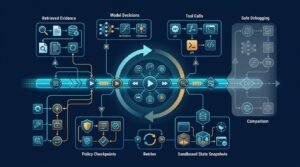
AI-specific controls belong at the points where data enters a model or the model receives retrieved context. Add them where it calls tools and returns an answer or action.
For an AI coding workflow, that also means protecting the software supply chain, including repositories, dependencies, secrets, containers, build systems, and pull-request approvals. This guide to secure AI-assisted software development favors scoped access and review gates over a blanket ban on coding assistants.
How to choose AI security software for your stack
The phrase “AI security platform” covers several product categories, so feature grids can mislead buyers. One platform may be strong at cloud discovery but weak at prompt protection, or the reverse.
Before booking a demo, decide which of these jobs you need:
| Security need | What the product should do |
|---|---|
| AI asset discovery and posture management | Use AI-SPM to find models, endpoints, datasets, identities, and cloud AI services. Show discovered assets with their severity, ownership, public exposure, and missing controls |
| Runtime protection | Provide runtime security for prompts, retrieved content, outputs, and tool calls. Support LLM security with the exact prompt, retrieved source, tool-call identity, and policy action |
| Development security | Scan code, dependencies, containers, model artifacts, and deployment pipelines. Show findings in the relevant build or deployment context |
| Response and audit | Create useful alerts, preserve evidence, support incident response, export logs, and integrate with existing ticketing or incident workflows used by security operations |
The strongest buyer decision is usually narrow. If you run a customer-facing RAG assistant with access to internal documents, prioritize prompt inspection, data controls, and tool-call enforcement. AI-SPM can add asset context, but it isn’t automatically prompt inspection or agent runtime enforcement.
If your main problem is untracked cloud AI services, AI-SPM is more relevant for cloud discovery and posture management. That focus doesn’t automatically provide prompt inspection or agent runtime enforcement.
Ask vendors for proof, not feature names
A demo should answer practical questions. Can the product show the exact prompt, retrieved source, tool call, and identity behind an alert? Can it block a risky action before it reaches a CRM or cloud account? Can you tune AI guardrails without breaking legitimate workflows?
Ask for red teaming evidence covering prompt injection, data leakage, and high-impact tool calls. Before signing, use this checklist:
- Deployment model, API access, tenant isolation, and contract terms
- Data leaving your environment, log location, data retention, and export options
- False-positive tuning and its impact on legitimate workflows
- Failure mode, including what happens when the service or connection is unavailable
If a vendor can’t explain what happens when its service fails, treat that as a warning.
Compare cloud-native and specialist options
Documentation checked: 2026; confirm current pricing and coverage before purchase.
Cloud providers are a sensible first stop when most of your systems sit in one cloud. Their cloud security tools already see assets, identities, logs, and configurations, giving cloud-native AI-SPM and security automation a practical starting point. That visibility can make extending existing controls more practical than buying an AI security platform.
Google Cloud businesses should evaluate Security Command Center as an AI-SPM option for inventory and security posture checks, especially when Google hosts most workloads. Google’s 2026 documentation describes Security Command Center Premium around AI-related protection, posture management, threat detection, and data security. Its service tiers and AI protection options list Standard as free, while paid tiers and Model Armor usage require closer cost review. It won’t inspect every custom app’s prompts or tool calls.
AWS-focused teams should assess GuardDuty AI Protection as an AI-SPM input for AWS activity. It isn’t complete runtime security for prompts, retrieved context, outputs, or tool calls. Current AWS documentation describes GuardDuty AI Protection as consumption-priced around analyzed CloudTrail data events, with a 30-day trial; confirm current pricing and eligibility before budgeting.
Microsoft-heavy businesses should evaluate Defender for Cloud alongside existing Microsoft identity and endpoint tooling, which can reduce integration gaps. Its cloud-platform coverage doesn’t automatically solve prompt injection or connector risk involving third-party models in every custom AI app.
When a specialist product is justified
Specialists such as Lakera and HiddenLayer focus more directly on model, application, and runtime threats. Their AI-SPM fit is strongest when you need application-level inventory and policy checks beyond cloud resources. Snyk is more relevant when AI-generated code, dependencies, and developer workflows are central, while Wiz is a broader choice for teams needing multi-cloud visibility.
I’d consider a specialist when a model handles sensitive data, invokes tools, or takes actions in production. This need increases with custom prompts, retrieval, connectors, or multiple model providers. For approved, consumer-style drafting tools, policies, managed accounts, DLP, and existing controls may offer better value than a specialist.
Pricing should match a real risk, not a fear budget
Published prices vary widely, and AI-SPM may be priced by cloud accounts, protected assets, data volume, or usage. Historical AWS and Google pricing pages illustrate the range, from consumption-based GuardDuty charges to tiered Security Command Center plans. Treat those examples as illustrative, and verify current 2026 terms on official pricing pages.
Many AI security vendors use quote-based pricing. That’s not automatically a problem, but comparisons get harder when costs vary by model endpoints, data sources, API traffic, users, log retention, premium support, or renewal increases.
Model the cost before you sign
Request a written estimate covering your expected AI endpoints, connected applications, data sources, cloud accounts, users, and monthly volume. Include implementation, connectors, log retention, API or token usage, policy tuning, employee training, support, and renewal increases. Also price data protection work and incident response, including integrations, retained evidence, escalation, and support for an actual event.
I’d also ask for a limited pilot with a fixed cost and measurable success criteria. Test AI-SPM coverage by discovering production AI endpoints, blocking defined harmful tool calls, or reducing unknown AI SaaS usage. A trial that produces only a dashboard screenshot proves little.
Deploy controls in the order that reduces risk fastest
A small team does not need a massive implementation program. It needs a sequence that protects high-risk workflows without stopping useful work.

Start with one production workflow
Choose the AI system with the most sensitive data or the most powerful permissions. Use AI-SPM findings to prioritize that choice, then confirm it through workflow testing.
Map the inputs, retrieval source, model, tools, identities, logs, and output destination. Track each control change so you can measure its effect.
Then apply the controls in order:
- Remove broad access, shared keys, and unnecessary integrations. Record each access path you remove.
- Add scoped identities, short-lived credentials, and approval gates for high-impact actions.
- Filter and redact sensitive input before it reaches the model. Use runtime security to inspect inputs, outputs, retrieved content, and tool calls before high-impact actions.
- Test prompt injection in direct user prompts and malicious instructions within retrieved documents. Document blocked attempts and successful defenses.
- Log requests, tool calls, blocked events, and policy changes. Review the records for gaps and repeated failures.
Agent access deserves more attention than most teams give it. Use scoped permissions for AI agents instead of granting a bot the same access as a senior employee.
For a small-business rollout, start with inventory and permission reduction. Next, pilot one production workflow and record blocked actions, approval rates, and sensitive-data exposures. After the pilot, formalize policies and logging. Validate the controls quarterly with fresh access reviews and workflow tests.
Sandbox agents that can browse or execute code
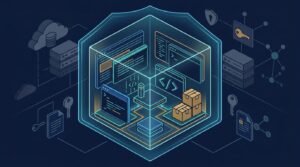
Agentic AI systems that browse or execute code can open files, download content, run commands, and carry authenticated sessions. Keep them separate from an employee’s regular browser profile and daily workstation environment.
Use a disposable environment, a low-privilege account, network allowlists, and human approval before purchases, exports, publishing, deployments, or permission changes. Use red teaming for controlled adversarial tests of browser and coding agents. A sandbox limits the blast radius, but it doesn’t make an agent safe by itself. This is the practical case for sandboxing coding agents and browser agents.
Measure security improvements, not product activity
A security dashboard full of alerts isn’t evidence that risk is lower. Track outcomes that show whether controls reduced exposure, improved governance, and limited business disruption.
AI-SPM tools can provide inventory and misconfiguration metrics, but validate them against real workflows. Security operations should turn meaningful alerts into tickets, escalations, or playbook actions. Use security automation for repeatable discovery, approvals, alert triage, and evidence collection.
A useful scorecard might look like this:
| Metric | Target | Owner | Review cadence | Action when target is missed |
|---|---|---|---|---|
| Known AI applications | Complete, current inventory | IT and security lead | Monthly | Investigate gaps and assign owners |
| Unknown tools resolved | All discovered tools reviewed | IT and security lead | Monthly | Block, approve, or remove each tool |
| Privileged agent actions requiring approval | 100% of defined high-risk actions | Application owner | Monthly | Tighten permissions and approval rules |
| Blocked sensitive-data transfers | No unexplained repeat attempts | Data owner | Monthly | Investigate the source and update controls |
| Critical configuration issues closed | All closed within the agreed service level | Security lead | Weekly | Escalate overdue issues |
| Test results | Critical controls pass scheduled tests | Control owner | Quarterly | Fix the control and retest it |
| Time to investigate an AI-related event | Within the agreed service level | Incident lead | Per event | Review evidence, staffing, and playbooks |
For incident response, track investigation time, evidence quality, and recovery readiness. Review metrics by likelihood, impact, and owner to support risk management.
The NIST Cybersecurity Framework is useful here because it keeps attention on governance, identification, protection, detection, response, and recovery. It gives smaller teams a way to organize the work without pretending they need a large-company security department.
Include AI-related dependencies, exposed endpoints, containers, and integrations in your vulnerability management process.
Review your inventory and controls every quarter to reassess security posture. AI features, model providers, integrations, and employee habits change too quickly for a once-a-year review.
Frequently Asked Questions
What is AI security software?
AI security software helps businesses discover, govern, and protect the AI systems they use or build. Depending on the product, it may provide AI-SPM, runtime protection, development security, data controls, or audit and response capabilities.
Is AI-SPM the same as runtime security?
No. AI-SPM focuses on discovering AI assets and assessing their configurations and exposure, while runtime security inspects activity such as prompts, retrieved content, outputs, and tool calls as they occur.
What should a small business protect first?
Start with the AI workflow that handles the most sensitive data or has the broadest permissions. Reduce unnecessary access, use scoped identities and approval gates, protect sensitive inputs, and test prompt injection before expanding the rollout.
Can existing cybersecurity tools protect AI applications?
Existing endpoint, identity, email, cloud, backup, and vulnerability-management tools remain essential, but they may not understand prompt injection, retrieved context, or excessive agent actions. Add AI-specific controls where models receive private data or can take real actions.
How should a business evaluate an AI security vendor?
Ask the vendor to demonstrate the exact prompt, retrieved source, tool call, identity, and policy action behind an alert. Also review deployment, data retention, failure modes, false-positive tuning, integration requirements, and measurable pilot outcomes before signing.
A practical buying decision
The best AI security software for a U.S. small business rarely means choosing the AI security platform with the longest feature list. Choose the option that protects sensitive data in your most exposed AI workflow. It should fit your existing cloud and identity stack and provide evidence your team can act on.
Assess agent permissions, deployment model, measurable controls, and total cost together. An AI-SPM tool may fit discovery and posture gaps, while LLM security controls protect language-model applications at runtime. These products should supplement, not replace, your existing cybersecurity tools.
Start with data access and permissions. Add runtime guardrails where AI can read private context or take real actions. Keep the budget tied to a defined risk, not a vague fear of AI or data breaches.
Visibility, least privilege, and tested controls will protect a small business better than another unused dashboard.
Editorial note: Future supporting articles could cover:
- A small-business checklist for cataloging AI assets and closing visibility gaps.
- A testing playbook for hostile instructions in customer-support retrieval systems.
- A permissions and isolation guide for coding and browser agents.