Have you ever wished an AI could actually operate your browser, click the right buttons, and finish the task without babysitting? That is the standout feature in Claude Sonnet 4.5, and it changes how you think about everyday work with its advanced computer use. In this guide, you’ll see what’s new, why the browser agent is a big deal, and how to build the exact workflows shown on video, from auto-pulling YouTube comments into a sheet to sending daily project updates by email.
Along the way, we’ll highlight what early testing shows, where it beats other tools, and how to get real value from “computer use” without wrestling with brittle automations.
 ## What’s new in Sonnet 4.5
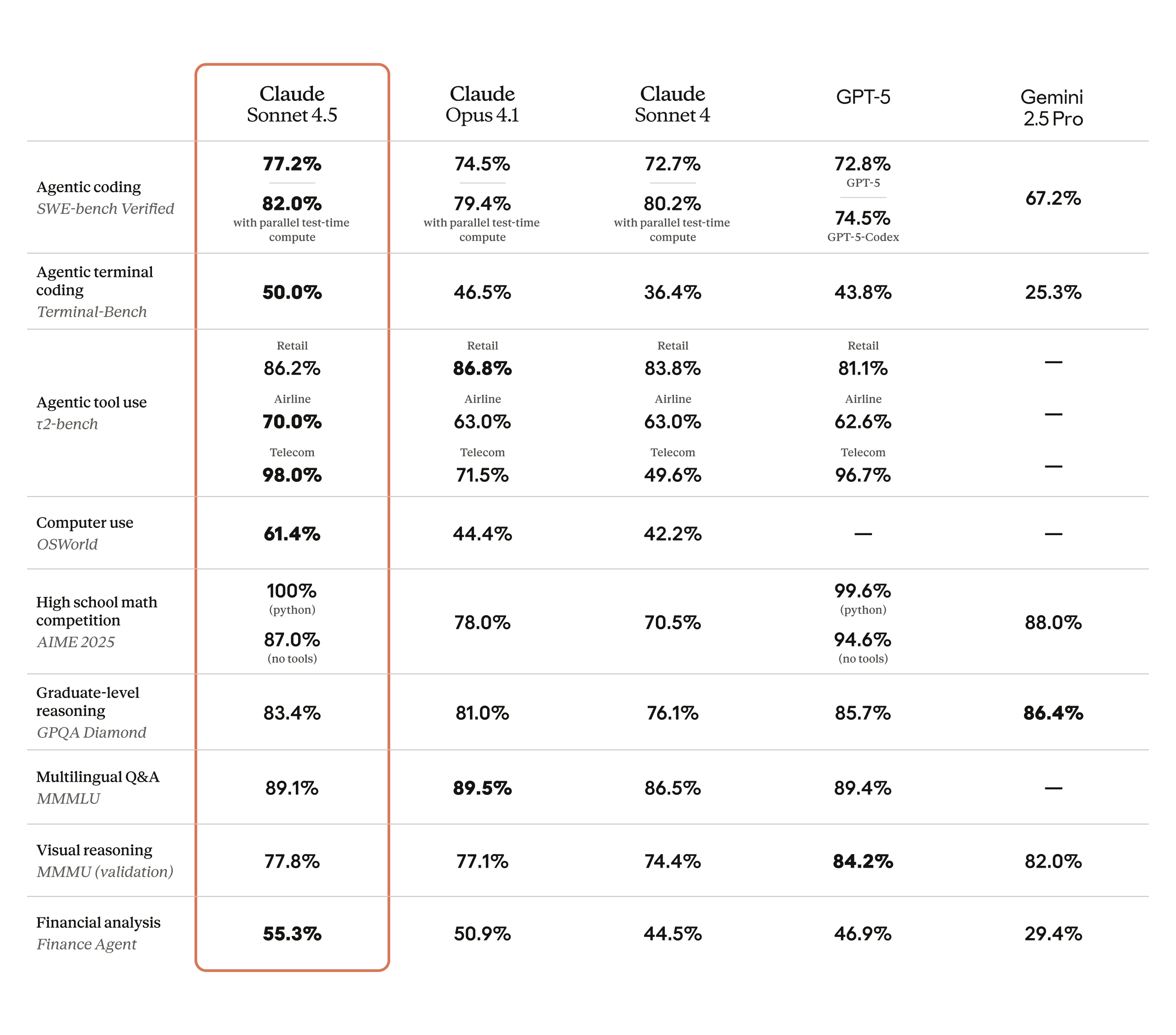
Claude Sonnet 4.5 is a major upgrade in both brains and hands. On OSWorld, a benchmark that mirrors real computer tasks, it now tops the board at about 61 percent, up from roughly 42 percent just a few months ago. That jump shows up in practice. Tasks that used to stall or misclick now finish cleanly, often on the first pass.
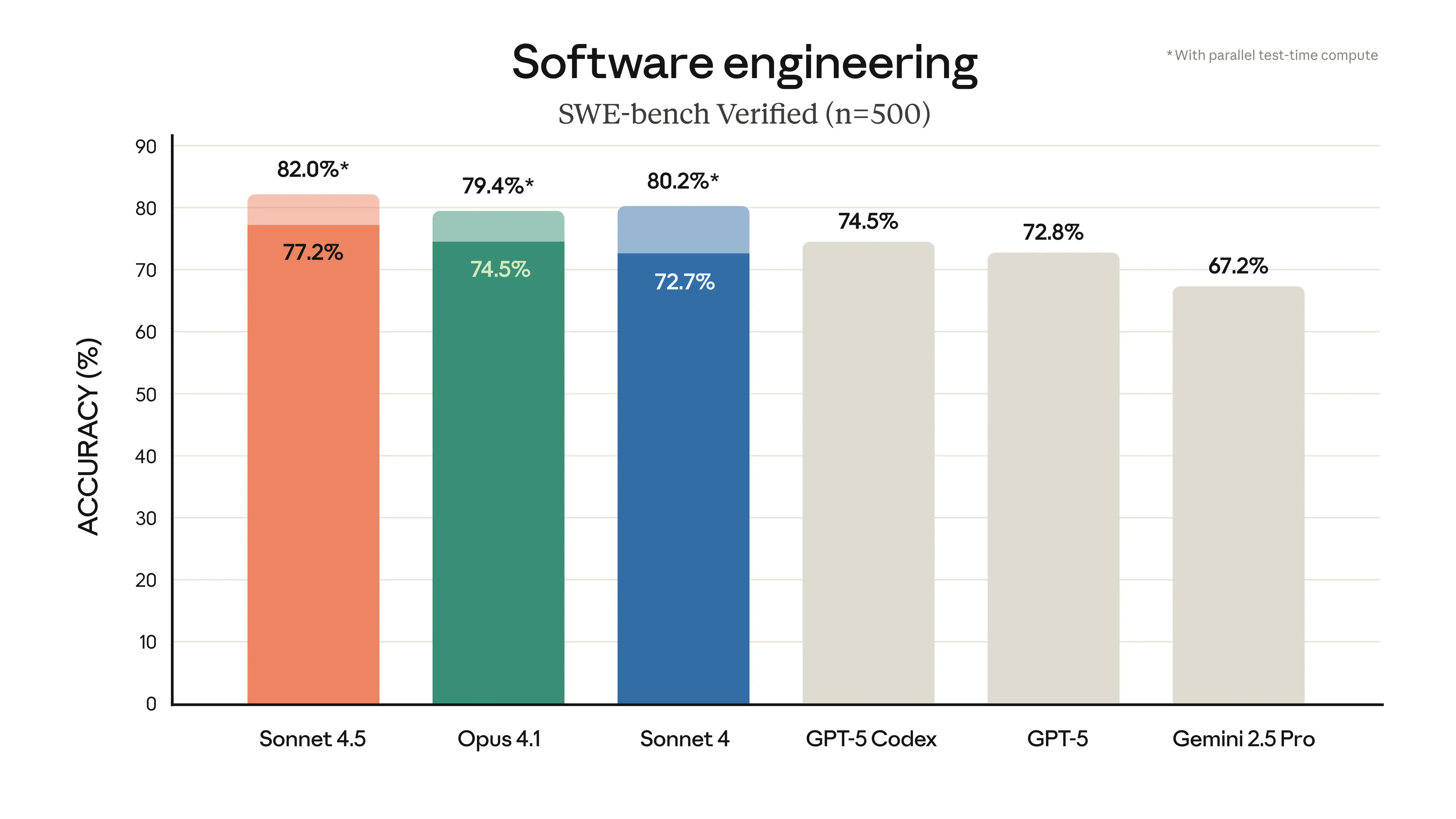
Beyond computer use, the model shows stronger reasoning, math, and software skills, with enhanced reasoning that supports complex problem-solving. It leads on practical coding tasks like SWE-bench Verified, excelling as a coding model in software development and tools like Claude Code. It can keep focus across long-running tasks and multi-step work. If you build or test agents, this matters. It stays coherent longer, handles tools in parallel, and recovers from small mistakes on its own.
For a deeper look at Anthropic’s update, check the official overview in Introducing Claude Sonnet 4.5 and the model details on the Claude Sonnet 4.5 page. If you want to see where it lands in cloud platforms, read the AWS announcement, Introducing Claude Sonnet 4.5 in Amazon Bedrock.
 ## The feature that steals the show: Computer use in your own browser
Most “agents” run inside a sandbox or a virtual machine. That sounds tidy, but it breaks down in real life. Cookies expire, you get logged out, or worse, your task completes with the wrong settings. Early users report things like grocery orders going to the wrong address and strange quantities, all because the agent didn’t use the same logged-in session as you.
Claude’s browser agent lives in your browser. You stay logged in to the services you already use. It clicks, scrolls, dismisses pop-ups, reads documents, and inputs data like a real assistant sitting at your computer.
A few practical observations from hands-on testing:
- It runs reliably across multi-step flows, including reading docs, composing email, and updating sheets.
- It handles cookie banners and permission prompts without derailing the task.
- It can ask for confirmation before critical actions, or you can opt into auto-approve for faster runs.
If you want a quick sense of Claude’s overall approach to safety and product scope, explore the Claude homepage. Anthropic is also transparent about alignment and safeguards, which helps if you work in regulated spaces.
Real workflow example 1: Turn YouTube comments into shorts ideas
This is a simple but useful example. The workflow reads comments from your latest YouTube video, extracts shorts ideas with hooks and outlines, and logs them into a Google Sheet. The magic is that it runs inside your browser session, so it can open YouTube Studio, apply filters, and paste the results into the sheet you choose.
How it works in practice:
- Create a preset command in the Claude for Chrome panel, for example: “Shorts ideas from YouTube comments.”
- The agent opens YouTube Studio, navigates to the newest video, and pulls the latest comments.
- It generates ideas, hooks, and quick scripts, then logs them into a Google Sheet.
- Optional scheduling lets you run this daily at 4 a.m. so you wake up to fresh ideas.
Why this matters: scheduling turns prompts into routines. You can repeat the same flow across multiple channels or projects and keep a single source of truth in sheets.
 ## Real workflow example 2: Daily project update emails from a Google Doc
Writing an email is rarely just “writing.” It is gathering details from docs, threads, and sheets, then summarizing the status. Claude’s agent can read a specific Google Doc for context using effective context management, draft an email in Gmail, and log the sent message in a Google Sheet through seamless tool use.
Step-by-step setup:
- Create a shared Google Doc as your project context. Include links, tasks, decisions, and timelines.
- Create a Google Sheet with columns for date and email content. This tracks what was sent.
- In Claude for Chrome, build a shortcut with three steps:
- Open the Google Doc and read the full content into context.
- Compose a new email in Gmail to your target recipient with a summary plus the next step.
- Append the date and a link to the sent email in your Google Sheet.
- Test it once manually. Then schedule it at 9 a.m. every day, or on weekdays only. These workflows can also be initiated or monitored via the VS Code extension for added flexibility.
During testing, the agent not only completed the email but also fixed a small mistake in the sheet by inserting a new header row after overwriting it. That self-correction is the kind of polish that makes this feel dependable.
If you want a broader look at where Claude shines and how it stacks up against Opus 4.1, our review covers strengths, limits, and real user feedback in the Claude AI Review 2025.
Real workflow example 3: Quick fact checks using another AI tool
Sometimes you want to verify a claim through model comparison with more than one AI model. The agent enables parallel tool execution by opening another AI service you already subscribe to, switching to the correct model, and cross-checking a statement. For example, type a quick command like “/validate,” paste the claim, and let the agent gather a verdict from an external system.
Tips for reliable checks:
- Phrase the validation prompt clearly, including the exact claim and time frame.
- Ask for citations or direct links if the other system supports it.
- Keep these flows manual rather than scheduled, since each claim is unique.
Why this agent feels different from past attempts
Plenty of products promised “agentic” help over the past year, but everyday users hit the same walls. They could not use your real accounts, they lost state, or they required heavy setup with brittle flows. Claude Sonnet 4.5 changes the dynamic with its improved agent architecture, featuring enhanced tool use and long-context stability through a larger context window.
From our notes and the data Anthropic shared:
- OSWorld computer use performance jumped by roughly 19 points, which tracks with the improved reliability seen in real workflows.
- Coding performance is state of the art on several public evaluations, and it now sustains focus across very long tasks.
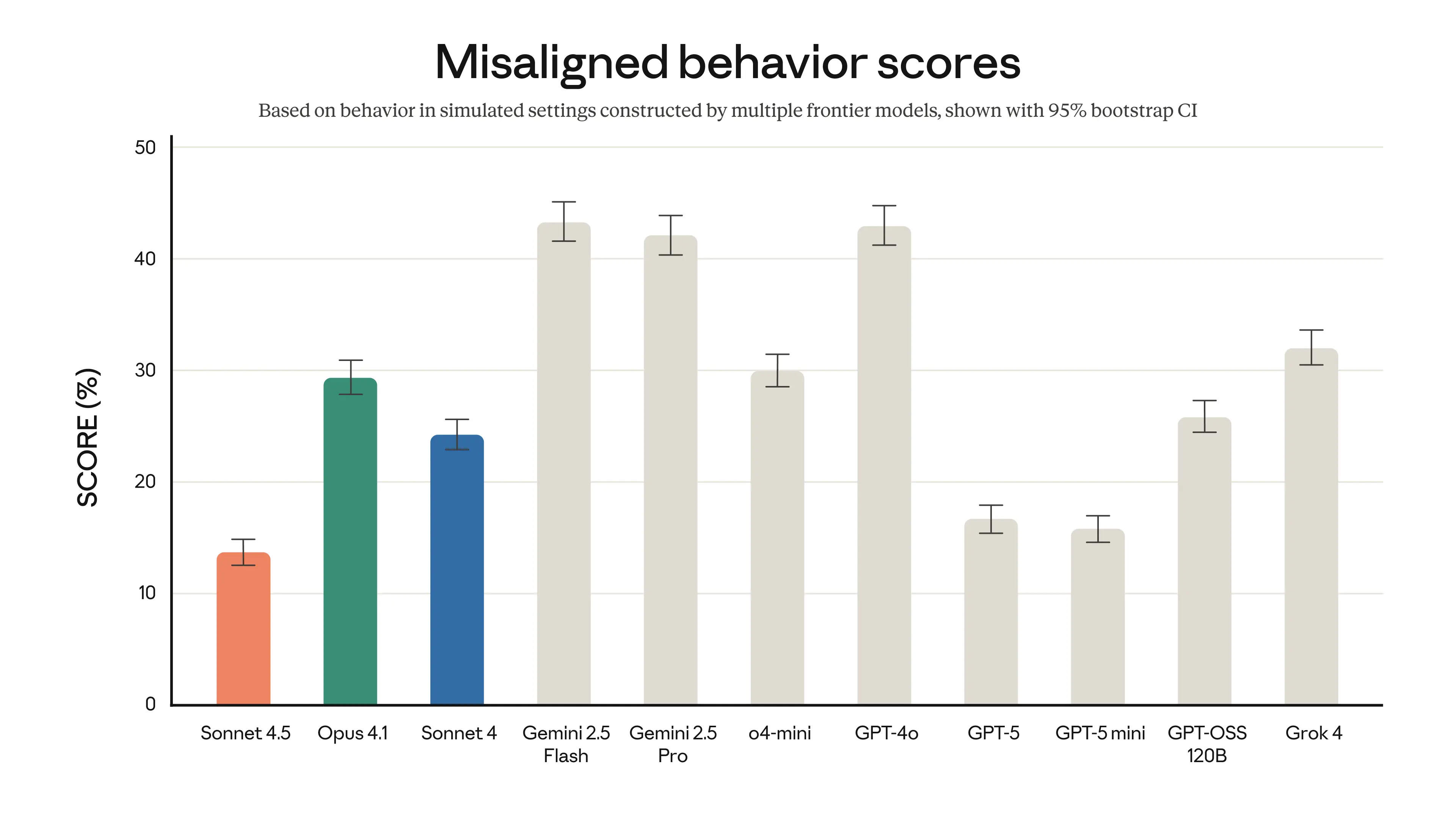
- Safety and alignment are improved, with training aimed at reducing sycophancy, deception, and other misaligned behaviors that can derail autonomous actions.
If you want to review Anthropic’s technical claims in one place, skim the official roundup in Introducing Claude Sonnet 4.5.
A smart way to reuse your prompts with computer access
You probably have go-to prompts you use weekly. Now is the time to rebuild a few as browser shortcuts on the developer platform. Start with tasks that already live in web apps, then add scheduling when it makes sense. Powered by the Claude Agent SDK, this enables advanced flows for handling complex workflows.
Good candidates to convert into long-running tasks:
- Weekly reporting pulled from docs, sheets, dashboards, and email.
- Lead list cleanup with enrichment from trusted sources, pasted back to your CRM’s web UI.
- Social content drafts that draw from recent comments or posts, stored in a central sheet.
- “QA sweeps” where the agent tests your step-by-step guides to flag anything stale.
Pro tip: For effective context management, keep a single “context hub” doc per project. The agent can open that doc first, read it, then act. You avoid stuffing prompts with long context, and your team always knows where to update the source of truth.p
Automations still help, but the agent reduces friction
Traditional tools like no-code automators are great for deterministic flows, marking an advancement in agent architecture compared to their rigid setups. You still might use them for simple triggers. What the Sonnet 4.5 agent adds is flexibility. It can open the right tab, dismiss prompts, and complete steps that vary day to day, much like complex agents designed for dynamic tasks. In testing, it even created a basic automation for sending a Gmail message when a webhook is triggered, already authenticated because it ran in the logged-in browser.
Two ways to combine them:
- Use the agent to build or repair your automations, since it can click through OAuth screens and permissions.
- Let the agent handle variable steps, then hand off to a simple automation for final posting or logging.
Sonnet 4.5 Availability, Pricing, and Safety
Here is what to know before you dive in:
- The browser agent is part of the Claude for Chrome extension and is rolling out to Max plan users first, with a limited early access group.
- Sonnet 4.5 pricing matches the previous Sonnet 4 tier in the API. For teams, this means better performance without a higher bill.
- Anthropic describes this release as their most advanced in safety and alignment—a frontier model so far—with stronger defenses against prompt injection and risky outputs. For a broad audience, that lowers the chance of harmful or misleading behavior when the model takes actions, while its stronger capabilities enable use in specialized fields like financial analysis and cybersecurity.
If you are integrating through cloud providers, you can also access Sonnet 4.5 through platforms like AWS as described in the Amazon Bedrock announcement.
Getting started checklist
- Install the Claude for Chrome extension, then enable asking before acting while you learn—these steps leverage the advanced capabilities of Claude Sonnet 4.5 for seamless integration.
- Create two shortcuts that demonstrate tool use:
- A scheduled research or ideation task that writes to a Google Sheet.
- A context-driven email task that reads a Google Doc and sends a summary in Gmail.
- Choose one validation command, like “/validate,” that opens your preferred AI tool for cross-checks.
- Start with a few clear, multi-step prompts. Use numbered steps, explicit links, and unambiguous field names. Keep them short and precise.
- Review the agent’s logs and outputs for a week, then enable scheduling for the ones that produce consistent value.
Where this goes next
Claude Sonnet 4.5 is not just a faster model. It is a strong computer user that operates inside the apps you already trust, enabling advanced complex agents. That leads to fewer broken sessions, fewer handoffs, and more repeatable wins through agentic coding and efficient code generation—especially by reducing vulnerability intake time for software tasks. When you can schedule those wins on a developer platform, your “prompt” becomes a process.
Want a fuller picture of Claude’s strengths, tradeoffs, and how it compares with others? Read our in-depth take in the Claude AI Review 2025. If you need the official specs and updates straight from the source, bookmark the Claude Sonnet 4.5 product page and Anthropic’s announcement, Introducing Claude Sonnet 4.5.
Ready to try a browser task you run every week and see if the agent can take it over by tomorrow morning?