
Key Takeaways
- ComicInk AI combines story planning, character and asset references, comic-page generation, and publishing tools in one workflow.
- Its comic creator currently lists 12 art styles and support for 22 languages, with series and issue tools for ongoing stories.
- Character Lock and Asset Memory help creators reuse recurring characters, props, and locations. In our five-page The Day My Shadow Quit test, the lead character stayed consistent with very little regeneration.
- Story Videos can turn a comic issue into a narrated, animated video with music, captions, and MP4 export.
- Comic pages generally cost 50 credits, reference images cost 10 credits, and 720p Story Video generation costs approximately 150–152 credits per second.
- Creators can share published comics on a free public storefront with its own web address.
What Is ComicInk AI?
ComicInk AI is an AI-powered comic creation platform built around a story-to-comic workflow. Its AI comic generator is designed to turn a premise or chapter into illustrated pages. A creator can start with a premise or chapter, develop a script with the platform’s Sidekick assistant, define recurring characters and visual assets, and generate comic pages containing panels, dialogue, and artwork. The platform also supports multi-issue series, a creator storefront, and a Story Video workflow. ComicInk is also available on iPhone and iPad, giving creators another way to work on their stories.
The main idea is to bring several parts of comic production into one place. Rather than treating each image as a disconnected prompt, ComicInk organizes work around a story, its cast, its locations, and the issues that make up a series. That structure may be useful to writers who need visual drafts, independent creators developing a recurring comic, or artists who want to speed up early-stage production. For this review, we used two separate comics to explore different parts of that process: One Kickman for story development and video, and The Day My Shadow Quit for multi-page visual consistency.
ComicInk should not be treated as a substitute for creative direction. A clear premise, a well-defined cast, readable dialogue, and editorial review still shape the quality of the finished comic. The platform can generate visual material, but creators remain responsible for checking whether each page communicates the intended story.
How to Create Comics With ComicInk AI
ComicInk’s workflow can be understood as a sequence: shape the story, define the visual references, generate pages, review the result, and publish the issue.
1. Start With a Story Concept
A project can begin with a short premise, a story outline, or a more developed script. Sidekick helps turn natural-language direction into story material and can assist with script writing and editing, as outlined on the ComicInk product site. This gives creators a place to define the central conflict, setting, characters, and major story beats before spending credits on image generation.
A useful starting brief should explain who the story follows, what the character wants, what stands in the way, where the events happen, and how the issue ends. Specific descriptions are more actionable than broad instructions such as “make it cinematic” or “create an exciting comic.”
2. Define Characters, Props, and Locations
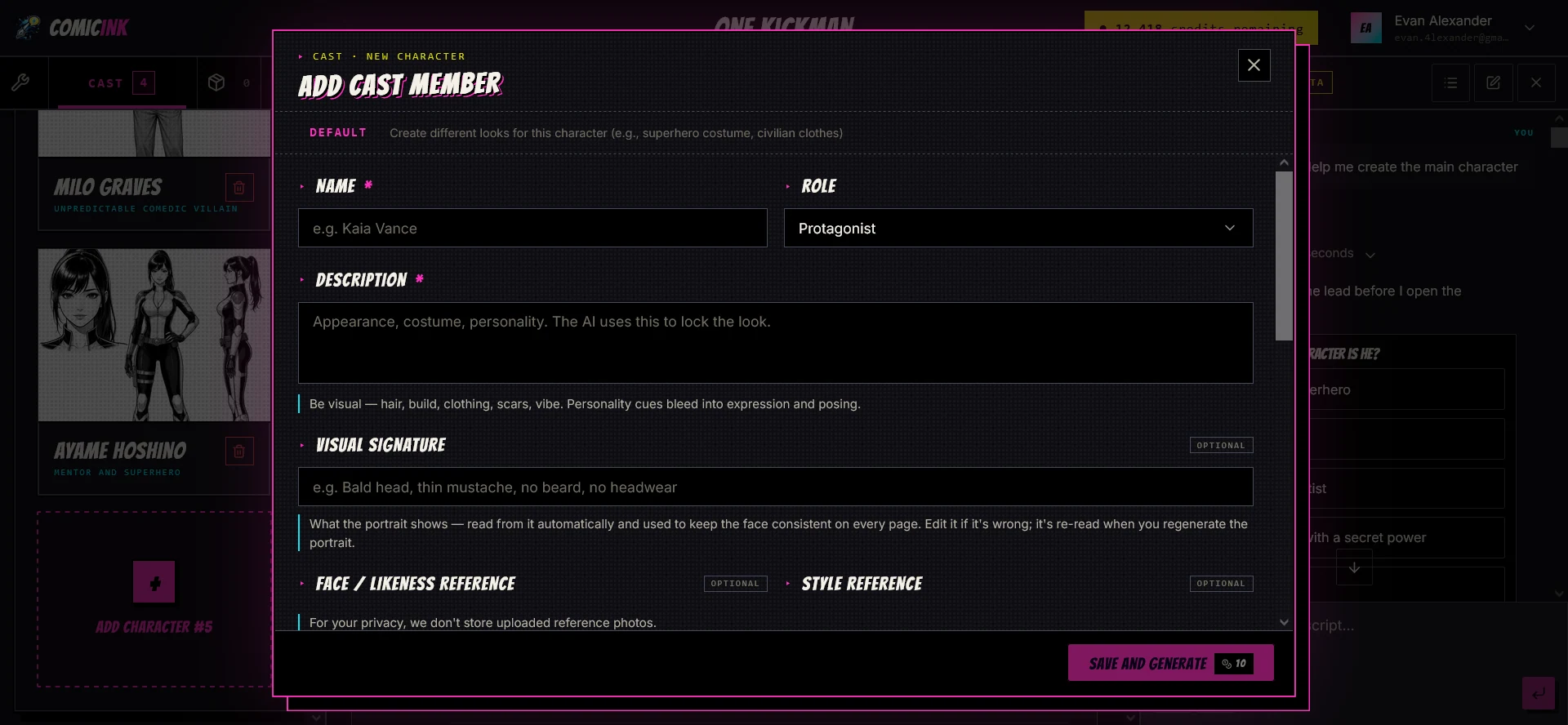
Before generating pages, creators can define characters and reusable visual references for props and worlds. ComicInk’s page-generation guide recommends creating character names, descriptions, and avatars first. The page-generation workflow matches characters to panels by name; when a script mentions a character that has not been defined, the generator may improvise, which can lead to inconsistent results.
This is an important production step for any story that reuses the same cast. A character reference should describe identifying details such as hairstyle, clothing, facial marks, body shape, and accessories. Recurring locations and important objects can also be saved as assets so they can be referenced again.
3. Choose a Series Style and Language
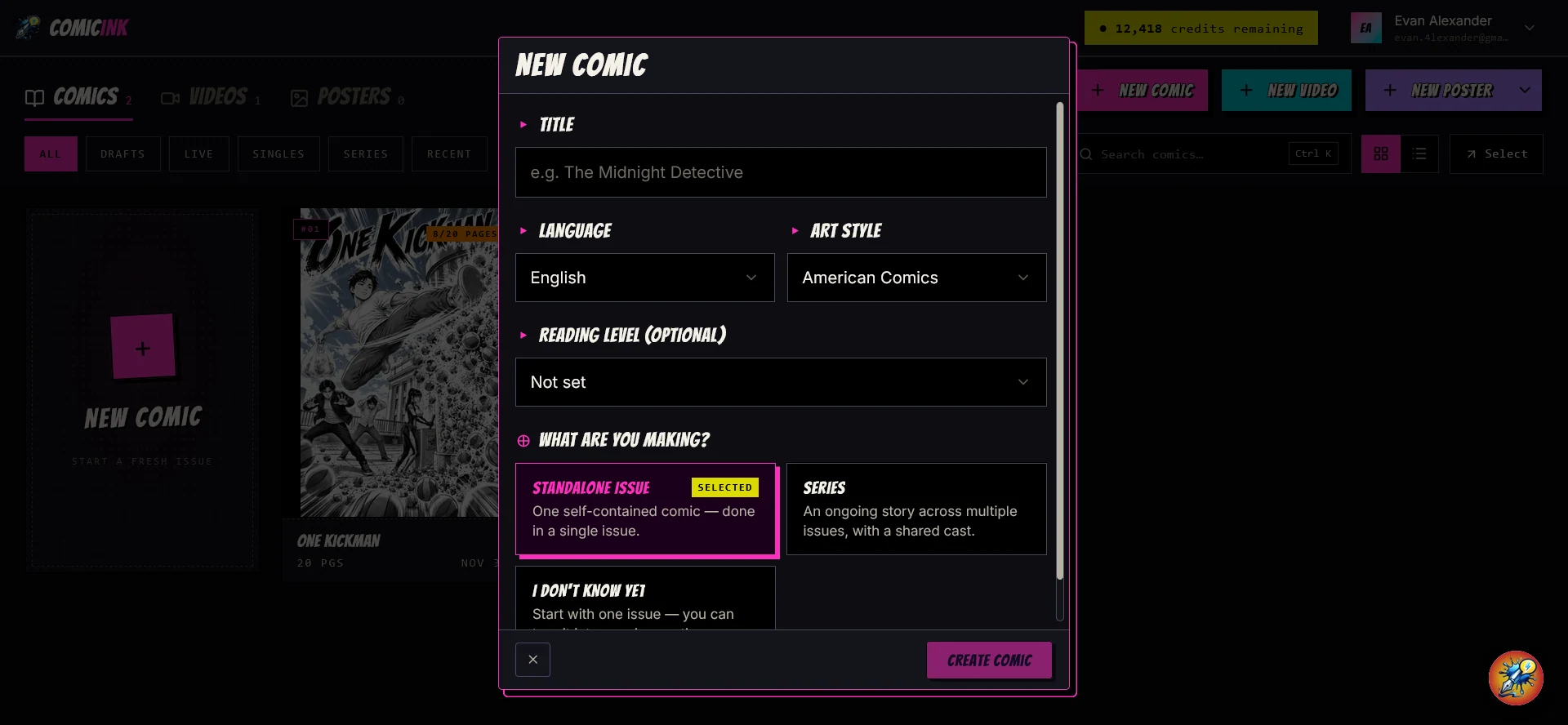
According to its art-style guide, ComicInk offers 12 comic art styles: American Comics, Manga, Manhwa, European BD, Cartoon, Realistic, Noir, Watercolor, Digital Art, Vintage/Retro, Chibi, and Pixel Art. The selected style applies across the pages, panels, character avatars, and cover for that issue or series, helping the project maintain a unified visual direction.
The platform also lists support for 22 languages for dialogue and narration. That may help creators adapt a story for audiences in different markets, although generated text and lettering should still be reviewed for natural phrasing, spelling, and cultural context.
One detail matters when planning a longer project: changing a series’ art style does not automatically restyle pages that have already been generated. Existing pages need to be regenerated if a creator wants them to match a new style.
4. Generate Pages and Refine the Comic
A comic issue contains between four and 36 pages. Each generated page can include one or more panels, characters, dialogue, and action. ComicInk currently lists a standard cost of 50 credits per page. A multi-panel page counts as one page render.
Creators can edit dialogue and narration text without regenerating the image. If a visual element needs correction, they can regenerate an individual panel or the full page; both actions are listed at 50 credits. This makes planning important: review the synopsis, character references, and panel direction before committing to another render.
The practical workflow is iterative. Generate a page, check whether the panel sequence reads clearly, confirm that character details are stable, and adjust the script or artwork where needed. A good first page does not automatically prove that a full issue will maintain the same quality.
Character Consistency: What References Can and Cannot Do
Character consistency is one of the most important challenges in AI comic creation. A character may look right in a close-up but change hairstyle, clothing, facial features, or proportions in a different panel. The problem becomes more noticeable in a series, where readers expect the same character to remain recognizable from one issue to the next.
ComicInk addresses this with Character Lock and Asset Memory. Creators can define a character once and reuse its reference across pages and video scenes. Props and locations can also be stored and reused. The system is designed to carry those references through a project rather than asking creators to reinvent the same details in every prompt.
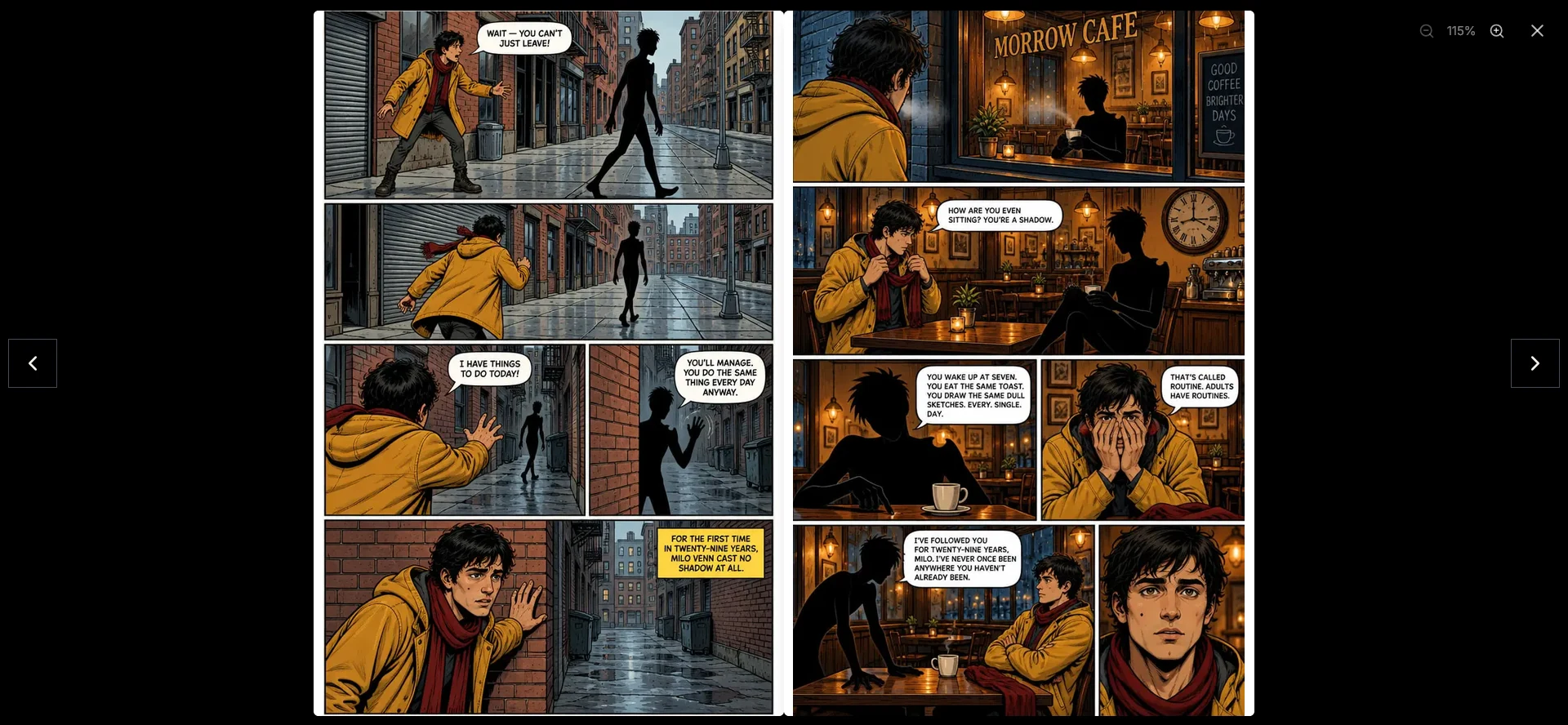
Character Lock and Asset Memory provide useful visual guidance, although AI-generated images may still vary between scenes. Review faces, clothing, proportions, and important props before publishing.
What We Made During Testing
We created two different comics and a Story Video using a ComicInk test account. Each project had a distinct purpose: One Kickman tested Sidekick’s story expansion and video workflow, while The Day My Shadow Quit tested how well a character could hold together across a short comic.
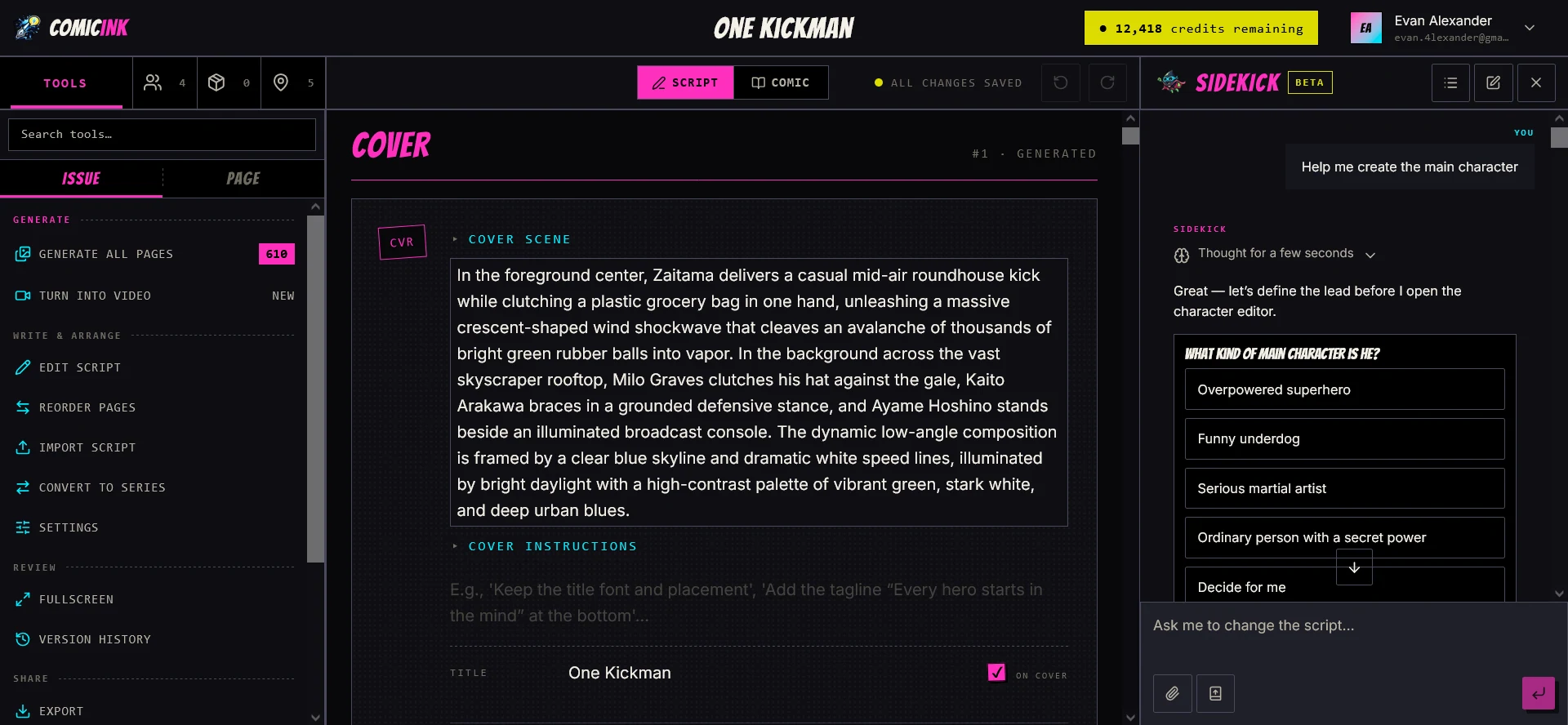
We started with One Kickman, a short superhero-comedy premise. Sidekick suggested several directions for the main character, and we chose one before building the cast. The project ended up with four characters and five locations, each with a reference image at 10 credits. After generating the cover and opening pages, we asked Sidekick to take the story further. It wrote another 12 pages with a deeper mystery, expanding the issue to 20 pages. Those additional pages first appeared as a script, giving us a chance to review and edit the narrative before spending credits on the artwork.
To test a different challenge, we then created The Day My Shadow Quit, a surreal story about a man whose shadow decides to leave him. We pasted a detailed five-page brief into Sidekick, including the premise, main character, and page-by-page outline. Sidekick produced the script and cast, and we generated a cover and all five pages at the listed 50 credits per render. Across the finished pages, the main character remained visually consistent, and we rarely needed to regenerate the artwork. That made the short comic workflow pleasantly straightforward.
For our video experiment, we returned to One Kickman rather than using The Day My Shadow Quit. We turned it into a three-scene Story Video, reviewing the storyboard frames before rendering the animated clips. The final result looked good overall and brought the comic to life. However, the movement was less fluid than the anime-style animation we had envisioned: it felt closer to an animated comic than a fully animated sequence. This is worth keeping in mind if smooth, continuous character animation is your priority.
A Practical Character-Consistency Check
Our tests also suggest a simple checklist for creators who want to evaluate character continuity in their own projects:
- Define one character with three to five distinctive visual details.
- Generate the character in different shot types, such as a close-up, a full-body view, and a side angle.
- Place the character in at least two different locations while keeping the reference attached.
- Compare facial features, clothing, accessories, proportions, and any recurring props.
- Record how many panels or pages needed correction and how many credits those revisions used.
A longer-term follow-up would be to reuse the same character in another issue and compare the results side by side. Our completed consistency check focused on five pages within one comic; we did not treat it as proof that every future generation will match.
ComicInk’s Art Styles, Languages, and Series Tools
The 12 comic styles give creators several visual directions, from Manga and Manhwa to American Comics, Noir, Watercolor, and Pixel Art. The style is selected at the series or standalone-issue level and is applied across the issue’s pages, panels, character avatars, and cover. Different series can use different styles, which is useful when a creator is developing separate projects with distinct audiences or genres.
ComicInk also supports 22 languages for comic dialogue and narration. Multilingual generation can help creators prepare localized versions, but it should not remove the need for proofreading. Humour, idioms, names, signs inside images, and reading direction can all affect how natural a translated comic feels.
For a recurring story, the Series and Issues structure provides a way to group multiple installments around a shared world, cast, and visual direction. That organization is more useful than generating unrelated pages one by one when the goal is to build a recognisable comic property over time.
Turn Comics Into Story Videos
ComicInk’s Story Video feature extends a comic issue into a short, shareable video. The documented comic-to-video workflow begins with an existing issue: its pages, panels, and characters become the basis for a storyboard. ComicInk then drafts a voiceover script scene by scene, generates narration, animates the scenes, and adds background music and captions. Creators can edit the narration before rendering, then publish the video to the public gallery or download it as an MP4.
The platform also presents a prompt-to-multi-scene video workflow, so creators can explore video generation without first building a complete comic issue. For creators who already have a comic, however, the comic-to-video route has a clear advantage: it reuses existing characters, assets, and visual direction instead of starting every scene from scratch.
Story Video generation is credit-intensive. ComicInk lists an approximate cost of 150–152 credits per second at 720p, with the exact estimate shown in the app before a render is confirmed. A 30-second video is therefore roughly 4,500 credits before any optional upscale or further revisions. That cost makes it sensible to begin with a short clip and review the in-app estimate before rendering a longer project.
Watch the official ComicInk demo:
Publishing Comics With a Free Creator Storefront
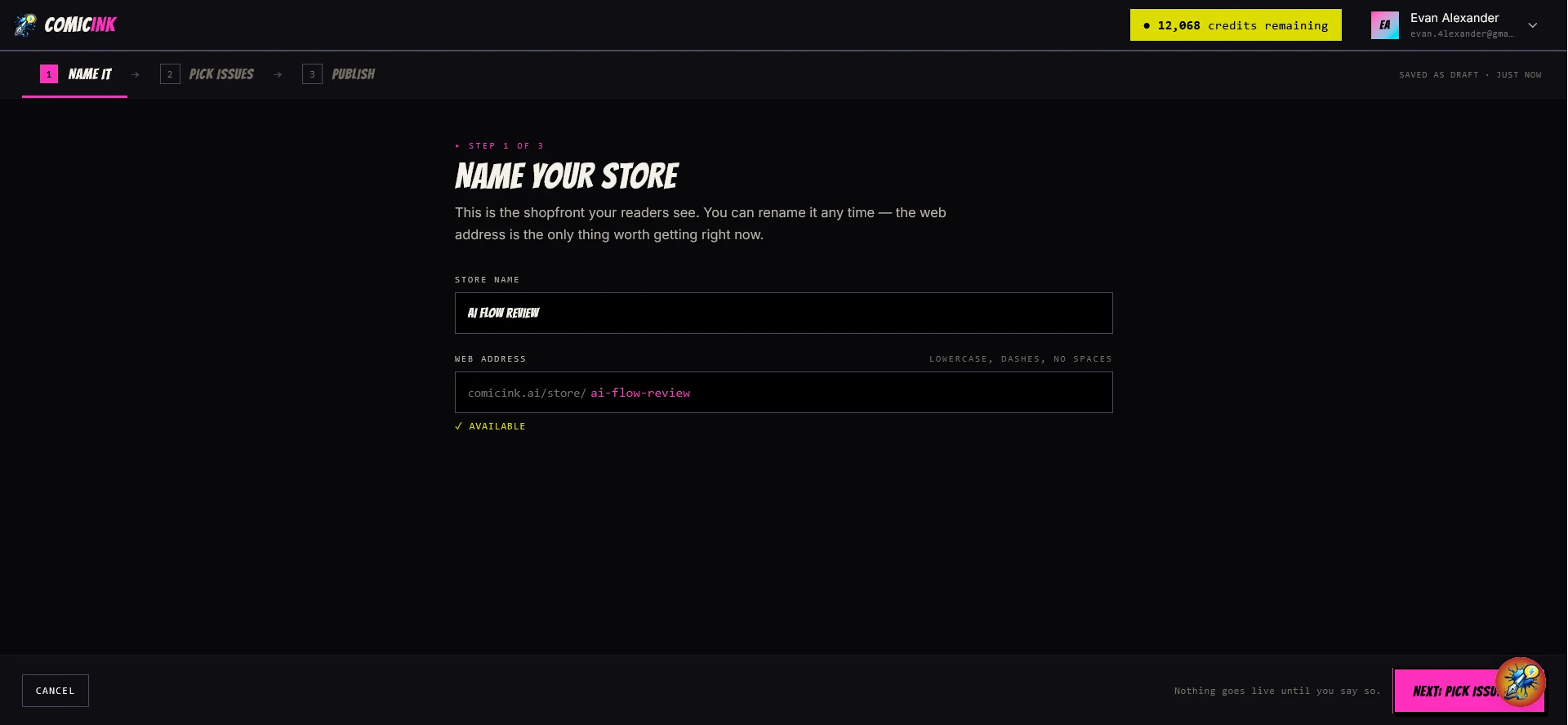
ComicInk gives creators a free public storefront to showcase their published comics. Setup takes three steps: name the store, pick the issues to include, and publish. The store gets its own web address (comicink.ai/store/your-name), and readers can browse the creator’s issues in one place.
Creators who want to sell their work commercially can do so through other channels. ComicInk’s Terms of Service say creators own the content they generate and may use it commercially, though some third-party video or audio models have their own terms, and the background music supplied for Story Videos is licensed for use within those videos only. Review the current terms before a commercial release.
ComicInk AI Pricing, Credits, and Getting Started
ComicInk uses credits for image and video generation. The current pricing page and credit guide explain the listed costs. New accounts start with 100 free credits, and the Help Center lists the first two comic renders per account as free. Those free renders can be a cover or a page. After that initial allowance, the standard costs below apply.
| Action | Listed credit cost |
|---|---|
| Generate a comic page | 50 credits |
| Generate a front or back cover | 50 credits |
| Create or regenerate a character, asset, or world reference | 10 credits |
| Generate a series title image | 10 credits |
| Generate a 720p Story Video | About 150–152 credits per second |
The current monthly plans are:
| Plan | Monthly price | Monthly credits | Sidekick allowance |
|---|---|---|---|
| ComicInk Basic | $9.99 | 1,500 | 150 messages |
| ComicInk Plus | $19.99 | 4,500 | Unlimited messages |
ComicInk also lists one-time credit packs as web subscription top-ups: 1,500 credits for $9.99, 4,500 for $24.99, 12,000 for $54.99, and 30,000 for $109.99. Prices are localized: visitors in the EU and UK see euros or pounds with VAT included, while visitors in the US and Canada see USD with applicable tax added at checkout. Check the displayed regional price and final checkout total; plan prices and availability may change.
For a comic-first project, the Basic plan’s 1,500 monthly credits are equivalent to about 30 page generations at the standard 50-credit rate, before spending credits on covers, references, translations, or revisions. The Plus plan provides about 90 page generations at the same rate. Video creators should plan separately: a 30-second 720p Story Video is approximately 4,500 credits. Always use the in-app estimate before confirming a render because the exact cost depends on the selected model and duration.
Who May Benefit From ComicInk AI — and What to Consider
ComicInk may be useful for independent writers who want to visualise a story before commissioning finished artwork, creators developing short-form comics, and artists who want to explore faster storyboarding. Educators may find comic pages useful for explaining a sequence or concept, while digital publishers can explore the series and storefront tools for packaging recurring content.
The fit depends on the project. ComicInk can reduce some of the work involved in drawing every panel, but it does not remove the need for story editing, panel review, visual quality control, and credit planning. Repeated generations can add to the cost, and video generation uses substantially more credits per finished second than a comic page.
For publishing, the free public storefront gives creators a simple page to share their issues. Review the current terms for commercial use and any third-party video or audio conditions before distributing work elsewhere.
Frequently Asked Questions
Do you need drawing skills to use ComicInk AI?
No. ComicInk is designed to turn written direction into illustrated comic pages, so users do not need to draw every panel themselves. Story planning, character definition, reviewing generated pages, and choosing revisions still require creative judgement.
Can ComicInk AI keep a character consistent across every page?
ComicInk provides Character Lock and reusable references to support consistent appearances. In our five-page The Day My Shadow Quit project, the main character remained recognizable with very little need for regeneration, although results can vary from project to project.
Can ComicInk turn a comic into a narrated video?
Yes. Its Story Video workflow can use an existing comic issue as the storyboard, draft and voice narration, animate scenes, add background music and captions, and export an MP4. Video generation consumes credits based on the rendered duration.
Can comics created with ComicInk AI be used commercially?
ComicInk’s current Terms of Service say creators own the content they generate and may use it commercially. However, some video and audio outputs may be subject to third-party model-provider terms. The background music supplied by ComicInk is licensed for use within videos made with the service, not as standalone music. Review the latest terms before commercial release.
How much does ComicInk AI cost?
New accounts start with 100 free credits and the first two comic renders are listed as free. Monthly plans start at $9.99 for 1,500 credits, while Plus costs $19.99 for 4,500 credits. Pages and covers normally cost 50 credits each, while Story Videos cost approximately 150–152 credits per second at 720p.
Final Thoughts
ComicInk AI combines story planning, reusable character and world references, comic-page generation, series management, free public storefronts, and Story Videos in one creative workflow. Its 12 comic styles and 22-language support offer flexibility, while Character Lock and Asset Memory help creators manage recurring stories.
Our two projects highlighted different strengths and expectations. The Day My Shadow Quit kept its lead character consistent across five pages with little regeneration, while One Kickman showed how an existing comic can become a narrated Story Video. We liked the video result, though its motion was closer to an animated comic than the smooth anime-style sequence we had imagined. Creators should still plan for story editing, visual review, and credit use as their projects grow.
Ready to turn a story idea into a comic? Explore ComicInk AI and review the available plans, free starting allowance, and creation workflow before beginning your first issue.