A photo-to-video template can turn one still image into a few seconds of believable motion: a wave, a dance step, a slow camera push across a hotel lobby. The technical part has become easy. The part that still trips people up comes after the render finishes: whose face is in the clip, whether viewers can tell it isn’t real footage, and whether the platform you post to agrees with the choices you made.
This guide is a working checklist for creators, social media managers and small brands who use these templates. It covers consent, likeness rights, AI labels and platform rules, then boils everything down to ten checks you can run in a couple of minutes before posting. It isn’t legal advice. Laws differ by country and, in the US, by state, so treat it as a sensible baseline and talk to a lawyer if you’re doing paid or high-stakes work.
Why photo-to-video templates need a checklist
What these templates actually do with a single photo
A template is a pre-built recipe. Someone has already decided the motion, the camera path, the timing and often the soundtrack. When you upload a photo, the model maps the face and body from your image onto that recipe and renders a new clip. The result is a realistic-looking video of a person doing something they never actually did.
That last sentence is the important one, because it is almost word for word how the platforms define the content they care about. TikTok’s help page on AI-generated content describes significantly edited AI content as including clips where “the primary subjects are portrayed doing something they didn’t do, for example, dancing.” YouTube’s disclosure policy requires creators to disclose realistic content that “makes a real person appear to say or do something they didn’t do.” A cheerful dance template fits both descriptions exactly.
Where creators usually get into trouble
Most problems don’t come from bad intent. They come from shortcuts. A few common patterns:
- The group-chat joke that goes public. Someone animates a friend’s photo as a laugh, then posts it to a public account where strangers, employers or family can see it.
- The celebrity shortcut. A famous face makes a trend template look instantly recognisable, so people drop in a photo of an actor or athlete.
- “Everyone knows it’s AI.” The creator skips the AI label because the trend feels obviously synthetic. Viewers scrolling past at speed often don’t know.
- The brand account that borrows a personal habit. A sound or a style that’s fine on a personal profile gets reused on a business account, where music licensing and endorsement rules are stricter.
- Kids in the frame. A parent animates a family photo without thinking about where the clip might travel.
Each of these is avoidable with a small amount of process, which is what the rest of this article is about.
Consent and likeness rights
Your own photos vs. photos of other people
Owning a photo file is not the same as having the right to animate the person in it. Copyright in a photo usually belongs to whoever took it. The person’s face and identity are a separate matter.
In the United States, that separate matter is mostly handled by the right of publicity. Cornell Law School’s Legal Information Institute summarises it as a right that “prevents the unauthorized commercial use of an individual’s name, likeness, or other recognizable aspects of one’s persona,” and notes that it is largely protected by state law, with only about half of US states recognising it distinctly. In practice that means the rules depend on where you and the person live and on whether the use is commercial. The simplest way to stay on safe ground everywhere is to get consent.
The platforms set their own floor on top of the law. TikTok’s AI-generated content page says it does not allow AI content showing “the likeness of adult private figures used without their permission.” YouTube’s privacy guidelines let people ask for removal of AI-generated or altered content that looks or sounds like them, and list “altering content to replace the face of one person with another person’s” as an example. So even where the law is unclear, an unconsented clip can still be taken down.
Getting clear permission (and keeping a record of it)
“Sure, go for it” in a hallway is not much protection if the person later changes their mind or forgets. A short written message works far better. Here is an example you can adapt:
“Hi Sam, I’d like to use the beach photo from Saturday in an AI dance template and post it on my TikTok and Instagram. It’s for my personal account, not an ad. Okay with you? If you ever want it taken down, just tell me and I’ll delete it.”
That message covers the four things that matter: which photo, what will happen to it, where it will appear, and whether money is involved. It also makes removal easy, which builds trust.
Keep the reply. A screenshot saved in a folder named after the project, next to the source photo and the final export, takes ten seconds and answers almost any question that comes up later. For brand or client work, use a simple signed release instead of a chat message.
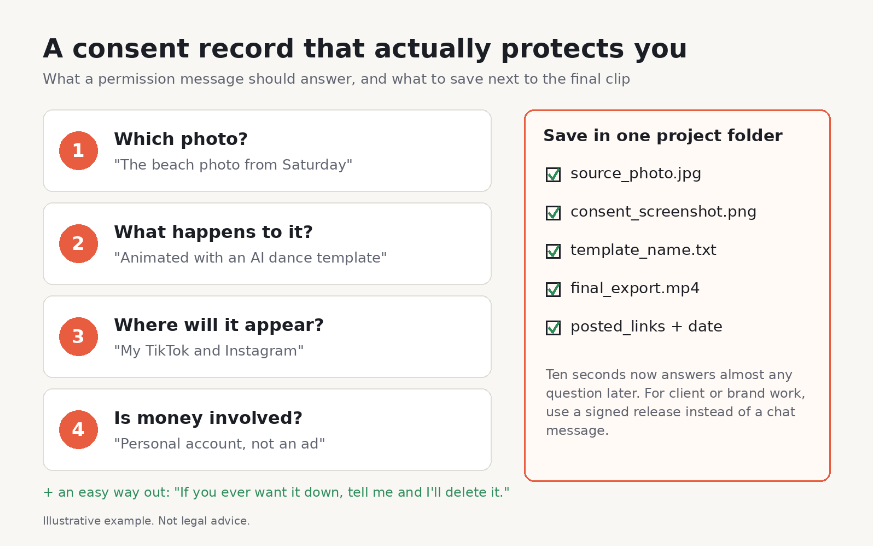
Image 1: Example consent record: the four questions a permission message should answer, and what to save alongside the final clip.
Public figures, minors and private individuals
Public figures. Being famous doesn’t make someone’s face free to use. TikTok says it doesn’t allow AI content that falsely shows public figures in certain contexts, including “being bullied, making an endorsement, or being endorsed.” YouTube’s examples of content that requires disclosure include “depicting a public figure stealing something they did not steal.” On the legal side, the US Copyright Office’s July 2024 report on digital replicas recommended new federal legislation to deal with the unauthorised distribution of digital replicas that realistically but falsely depict a person. For a template video, the practical rule is short: don’t animate celebrities, politicians or influencers you don’t have permission from, and never in a way that implies they endorse something.
Minors. TikTok’s AI-generated content page also lists “the likeness of young people under the age of 18” among content it doesn’t allow. Even with your own children, it’s worth asking whether a public post is necessary at all, since you can’t control where a clip ends up once it’s shared.
Intimate or sexual content. This is a hard line, not a grey area. In the US, the TAKE IT DOWN Act, signed into law in May 2025, criminalises publishing nonconsensual intimate images, including AI-generated “digital forgeries,” and requires covered platforms to remove reported images within 48 hours of a valid request. No template, joke or “it’s obviously fake” argument changes that.
Private individuals. Friends, coworkers, strangers in the background of a photo: if they are identifiable, ask. If you can’t ask, crop them out or pick a different photo.
Labeling AI-generated video
When and how to disclose
A good working rule: if a reasonable viewer could mistake the clip for real camera footage, label it. That matches the line all three major platforms draw between realistic content (label it) and obviously stylised or cartoon content (labeling is optional or not required).
Regulation is heading the same way. Article 50 of the EU AI Act requires deployers of AI systems (people or organisations using them in a professional capacity, since purely personal, non-professional use falls outside the definition) who create a “deep fake” (AI-generated or manipulated content that resembles real people, places or events and would falsely appear authentic) to disclose that it was artificially generated or manipulated. For work that is evidently artistic, creative, satirical or fictional, the obligation is lighter: disclose in an appropriate way that doesn’t spoil the work. The Act’s timeline sets these transparency rules to apply from 2 August 2026.
The best habit is to disclose twice: switch on the platform’s own AI label, and add a short line in the caption such as “Made with an AI photo-to-video template.” The toggle gives you the official label. The caption survives reposts, screenshots and downloads.
Platform labeling rules (TikTok, Instagram, YouTube) in plain terms
TikTok. TikTok’s Community Guidelines require creators to label AI-generated or significantly edited content that shows realistic-looking scenes or people, and say unlabeled content may be removed, restricted or labeled by TikTok. Before posting, turn on “AI-generated content” under More options; viewers then see “creator labeled as AI-generated.” TikTok may also apply its own “AI-generated” label automatically, for example when a file carries C2PA Content Credentials, and its help page says an auto label can’t be removed.
Instagram and Facebook. Meta requires you to label content with “photorealistic video or realistic-sounding audio that has been digitally generated or altered, including with AI,” and warns there may be penalties if you don’t. Images are not required to be labeled, but they can still get one if Meta’s systems detect AI signals. Meta also adds “AI info” labels when it detects industry-standard AI indicators, including from third-party tools. On Instagram, look for the “Add AI label” toggle when you create a post or Reel.
YouTube. During upload in YouTube Studio, the “AI use” question under Attributes is where you disclose. YouTube requires it for realistic content that makes a real person appear to do something they didn’t, alters real footage, or creates a realistic scene that never happened. Beauty filters, colour fixes and clearly unrealistic content don’t need it. YouTube says creators who consistently fail to disclose may face penalties, including content removal or suspension from the YouTube Partner Program.
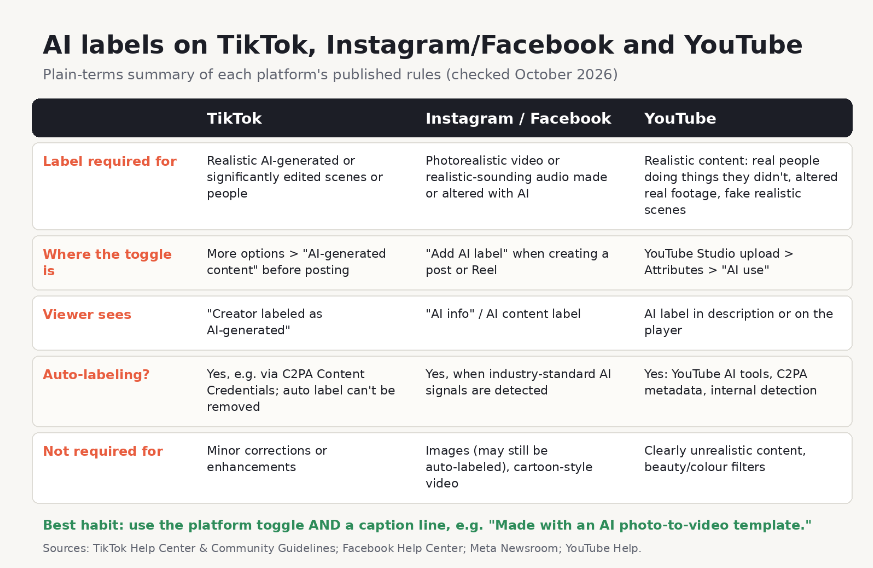
Image 2: Side-by-side table of what TikTok, Instagram/Facebook and YouTube require, where the AI toggle lives, and whether the platform can auto-label.
Platform policies to check before posting
Synthetic media and impersonation rules
A label is necessary, but it isn’t a free pass. TikTok’s guidelines say plainly that “even with labels, some edited or AI-generated content can still be harmful,” and that content which is misleading about matters of public importance or harmful to individuals isn’t allowed. Meta says it will remove content, AI-made or not, that breaks its rules on things like bullying and harassment. YouTube applies its Community Guidelines to all content, including AI-generated content.
Impersonation is the other trap. TikTok lists impersonation under deceptive behaviours that can lead to account restrictions or bans. In practice, that means not naming an account after a real person you’ve animated, not writing captions in someone else’s voice, and not presenting a template clip as a real event.
Music, brand logos and copyrighted elements
Templates often come bundled with a soundtrack or a recognisable visual style. Three things to check:
- Audio rights. TikTok’s guidelines say you should only post content you created or have the right to share. A trending sound that’s usable on a personal profile may not be licensed for a brand or client account, so check the platform’s music library for your account type. On YouTube, AI-generated music that is the main focus of a video also needs to be disclosed.
- Logos and products. If the source photo shows a brand’s logo, an animated clip can look like a sponsored post. Blur or crop logos unless the brand is actually your client.
- Who owns the output. Don’t assume you can stop others from copying a template clip. The US Copyright Office’s January 2025 report concluded that AI outputs can be protected by copyright only where a human author has determined sufficient expressive elements, and not through “the mere provision of prompts.” Your own editing, arrangement and added footage can still be protected.
A pre-publish checklist
10 quick checks before you hit post
Print this, pin it, or paste it into your content calendar template.
- Every face is mine or has a written yes. No exceptions for “they won’t mind.”
- The consent covers this use. Personal post vs. ad, this platform vs. every platform.
- No minors’ likeness in public posts.
- No public figures. Especially nothing that looks like an endorsement.
- Nothing harmful or embarrassing. The clip doesn’t show a real person doing something they’d object to.
- Platform AI label is on if a viewer could mistake it for real footage.
- The caption says it’s AI, so the disclosure survives reposts.
- Audio is cleared for this account type.
- No logos or brands that imply a sponsorship that doesn’t exist.
- The record is saved: source photo, consent message, template name, export date. And you’re ready to delete quickly if anyone asks.
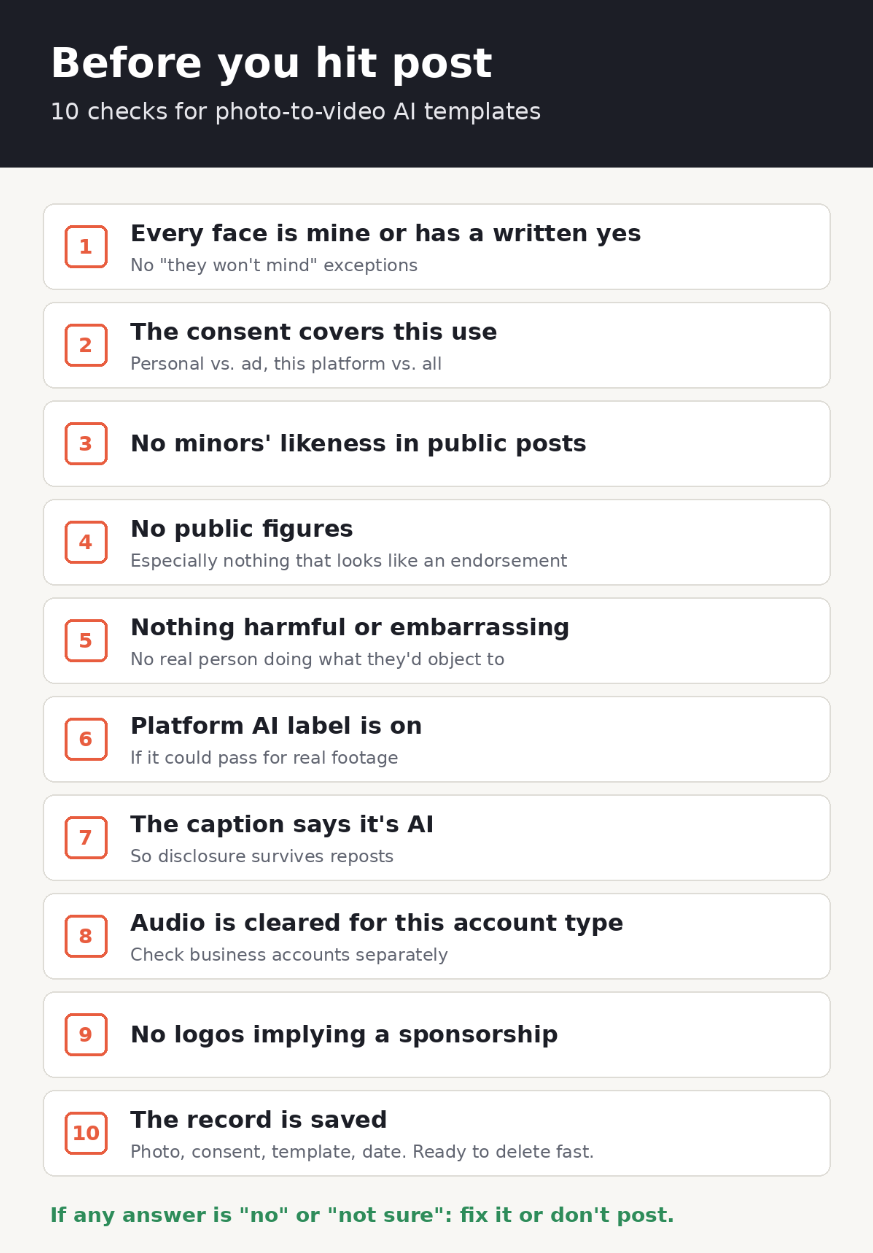
Image 3: The 10-point pre-publish checklist as a one-page graphic creators can save.
Choosing tools that make responsible use easier
What to look for: clear terms, content rules, labeling support
The checklist works with any tool, but some tools make it easier to follow. Before you commit to one, look for:
- Written content rules. A clear ban on impersonation, minors and sexual content tells you the provider has thought about misuse.
- Clear upload terms. You should be able to find how long uploaded photos are kept, whether they’re used for anything else, and how to delete them.
- Provenance support. Ask whether exports carry C2PA Content Credentials. TikTok says it can use them to label AI content automatically. If a tool doesn’t add them, you’ll need to rely on manual labels, which is fine as long as you actually use them.
- Honest template descriptions. You should know whether a template produces stylised or photorealistic output, because that’s what decides whether a label is required.
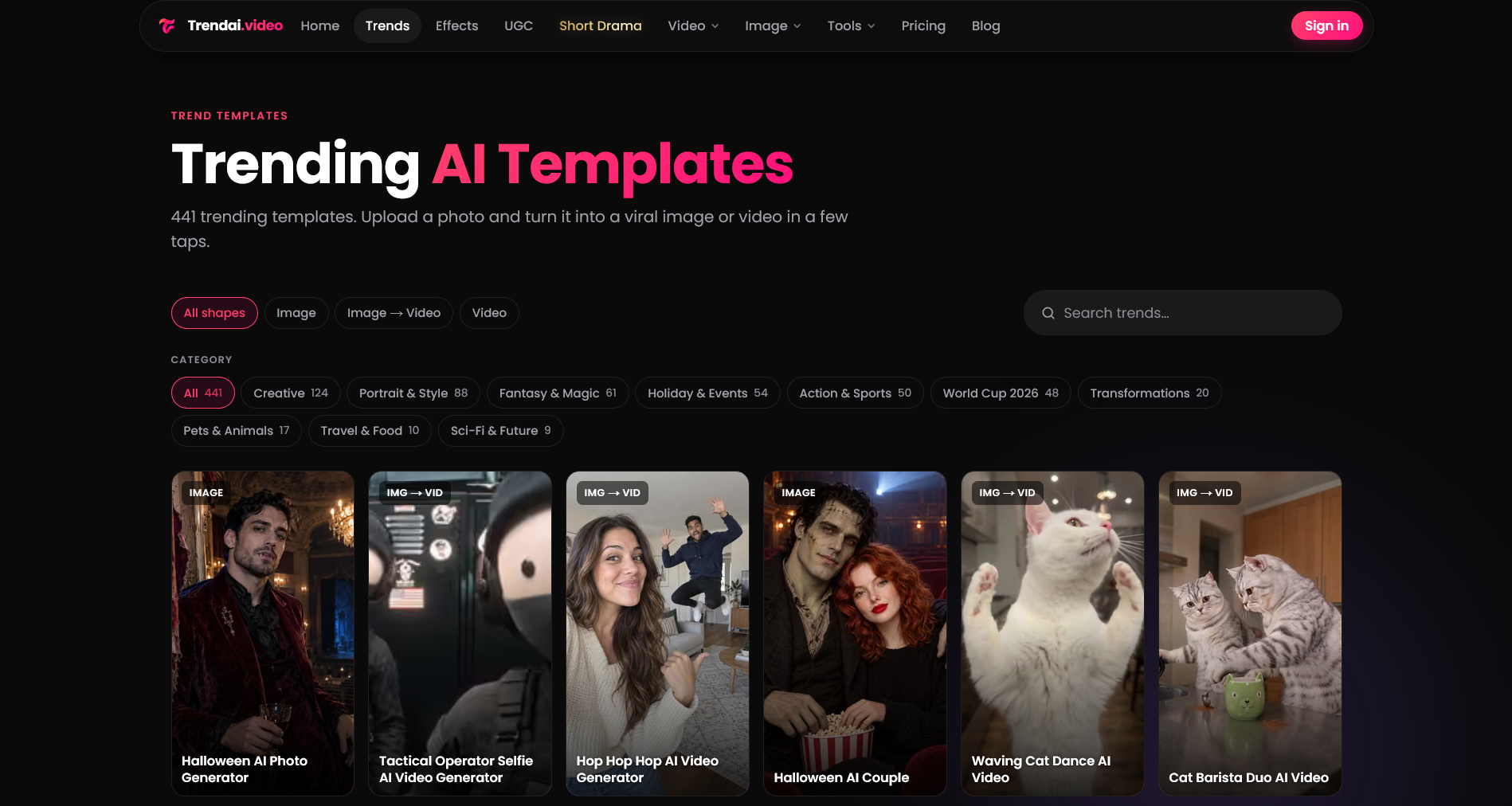
As one example of what a template-based photo-to-video tool looks like in practice, our team runs Trendai.video, where you pick a trend from a library of photo-to-video templates, upload a photo and get back a short clip or image. The site’s footer states its responsible-use rule in plain words: use your own photos, or photos of people who agreed, and don’t impersonate real people or celebrities. That kind of rule is worth looking for in any tool you use. But a tool’s terms don’t replace your own judgment, so run the checklist anyway.
Key Takeaways
- Only animate photos you own or have clear permission to use, and keep a record of that permission.
- Disclose AI-generated video the way each platform asks: the platform’s AI toggle plus a short caption.
- Check synthetic media and impersonation rules before posting. A label doesn’t make a harmful or deceptive clip acceptable.
- Treat public figures, minors and intimate content as hard stops, not judgment calls.
- A short checklist before publishing prevents most problems, and it takes less time than handling a takedown.
FAQ
Do I have to label AI-generated videos on TikTok?
Yes, if the content shows realistic-looking scenes or people. TikTok’s Community Guidelines require a label for realistic AI-generated or significantly edited content, and unlabeled content may be removed, restricted or labeled by TikTok. Turn on “AI-generated content” under More options before posting.
Is it legal to animate someone else’s photo with AI?
It depends on where you are, who the person is and how you use the clip. In the US, the right of publicity is mostly state law and focuses on commercial use of someone’s likeness. Platform rules are often stricter than the law: TikTok, for example, doesn’t allow AI content using the likeness of adult private figures without their permission. Getting written consent is the safest approach everywhere.
Does Instagram detect AI-generated videos automatically?
Sometimes. Meta labels content when it detects industry-standard AI signals, including from third-party tools, but it also notes that not all AI content carries the information needed to identify it. Don’t rely on detection. If the video is photorealistic, Meta requires you to add the label yourself.
Can I use a celebrity’s photo in an AI video template?
Generally, no. Public figures still have likeness rights, and platforms specifically restrict AI content that falsely shows public figures, for instance making or receiving an endorsement on TikTok. Using a famous face in a commercial or promotional post carries the most risk.
Who owns the copyright to an AI-generated video?
According to the US Copyright Office’s January 2025 report, AI-generated material is protected only where a human has determined sufficient expressive elements, and prompts alone aren’t enough. Human contributions such as editing, arrangement or added original footage can be protected. Rules differ in other countries.
Sources
- TikTok Help Center, “AI-generated content”: https://support.tiktok.com/en/using-tiktok/creating-videos/ai-generated-content
- TikTok Community Guidelines, “Integrity and Authenticity”: https://www.tiktok.com/community-guidelines/en/integrity-authenticity
- YouTube Help, “Disclosing use of GenAI content”: https://support.google.com/youtube/answer/14328491
- YouTube Help, “YouTube Privacy Guidelines”: https://support.google.com/youtube/answer/7671399
- Facebook Help Center, “Label AI content on Facebook”: https://www.facebook.com/help/7434563519957988
- Instagram Help Center, “Label AI content on Instagram”: https://help.instagram.com/761121959519495
- Meta Newsroom, “Our Approach to Labeling AI-Generated Content and Manipulated Media”: https://about.fb.com/news/2024/04/metas-approach-to-labeling-ai-generated-content-and-manipulated-media/
- EU AI Act, Article 50 (Transparency obligations): https://artificialintelligenceact.eu/article/50/
- U.S. Copyright Office, “Copyright and Artificial Intelligence” (Part 1: Digital Replicas; Part 2: Copyrightability): https://www.copyright.gov/ai/
- U.S. Copyright Office, NewsNet Issue 1060 (Part 2 release, January 29, 2025): https://www.copyright.gov/newsnet/2025/1060.html
- Cornell Law School LII, “Right of Publicity”: https://www.law.cornell.edu/wex/publicity
- Congressional Research Service, “The TAKE IT DOWN Act”: https://www.congress.gov/crs-product/LSB11314